
UK buying shortlist
Best Thunderbolt Docks and Docking Stations for Laptops in the UK (2026)
Written by Work & DIY Desk Work and DIY editorial desk · Desk Productivity beat · reviewed 13/05/2026
Choose this guide when you are comparing Thunderbolt docking stations for a UK laptop setup and need compatibility, display, cable and desk-fit checks before choosing a Top 4 route.
Quick answer · Top 4
Compare all four options
Open a product to review its fit, limitations and buying checks before choosing a retailer.
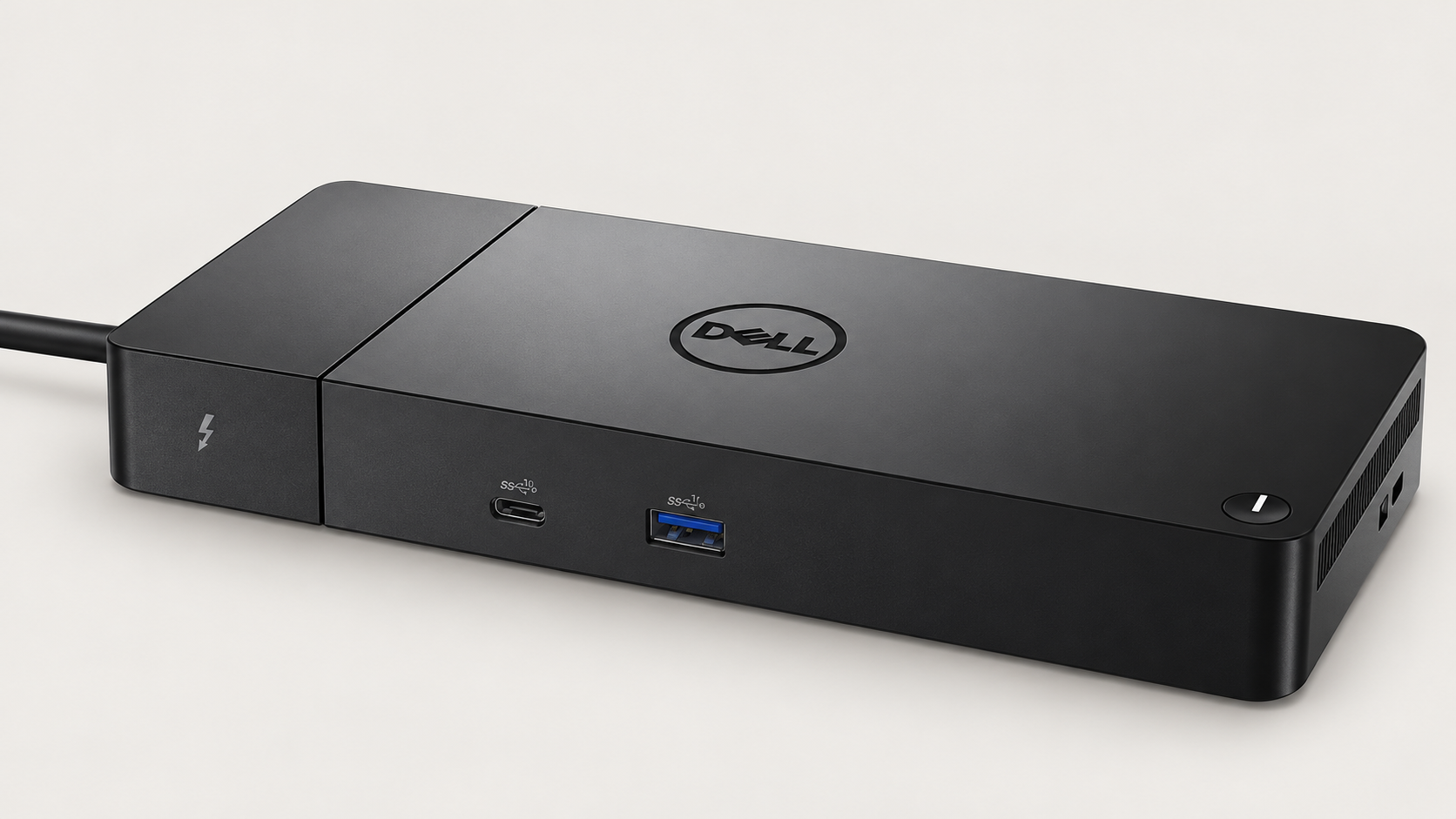
Pick 1 - Dell host charging
Dell Thunderbolt Dock WD22TB4
At a glance:Compatible Dell laptop desks where the documented Dell charging behaviour matters.
Trade-off:The 180W adapter label is not laptop charging power; Dell-specific power-button behaviour depends on the exact compatible host.
Official reference; not an affiliate buying link.
Compare all 4 picks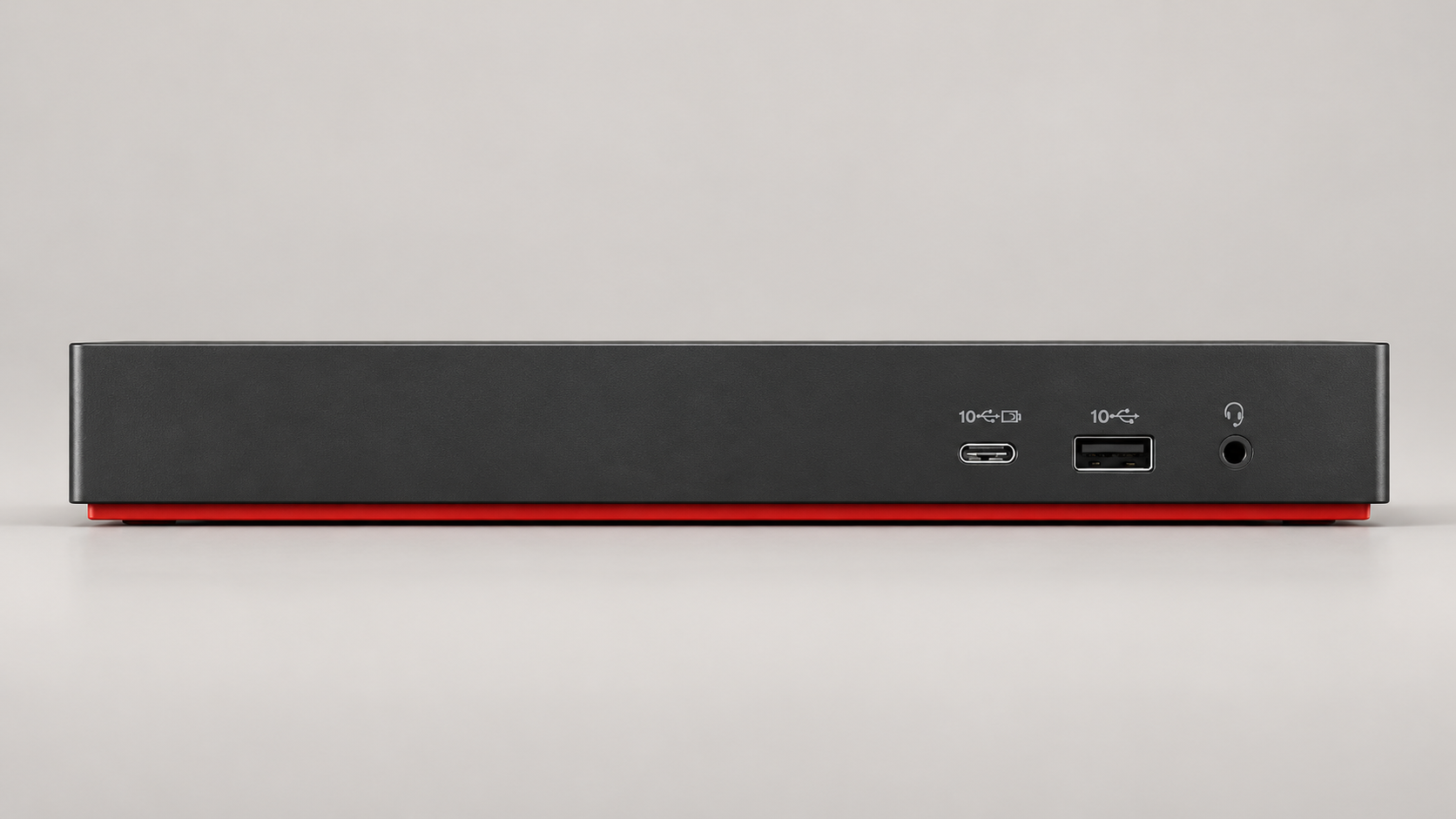
Pick 2 - Managed ThinkPad desks
Lenovo ThinkPad Universal Thunderbolt 4 Dock
At a glance:Managed ThinkPad or Windows laptop desks after checking the exact host and display combination.
Trade-off:ThinkPad management features may be unavailable on other Lenovo or non-Lenovo hosts; Universal is not a compatibility guarantee.
Official reference; not an affiliate buying link.
Compare all 4 picks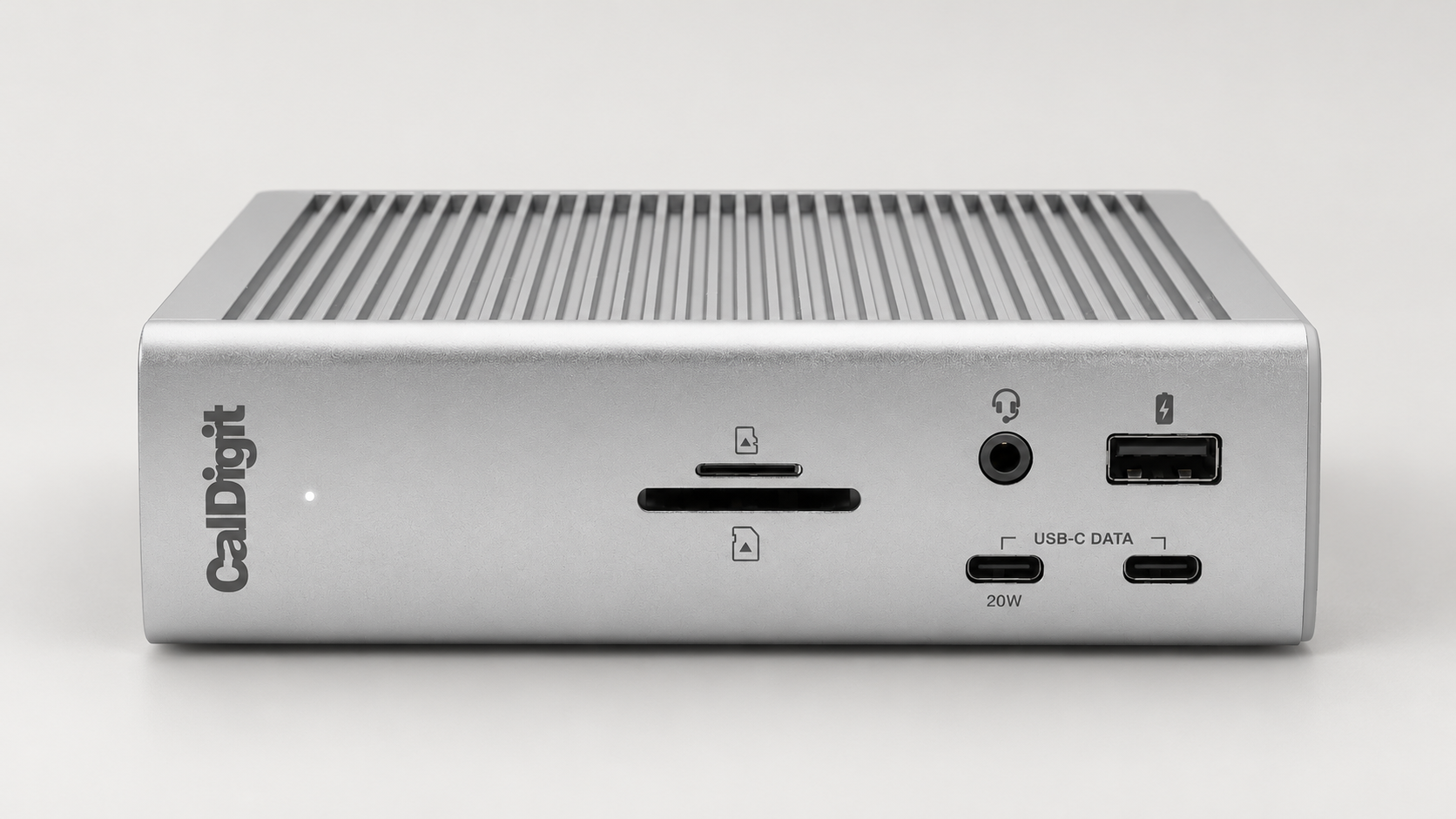
Pick 3 - Port-heavy desk setups
CalDigit TS4 Thunderbolt Station
At a glance:Peripheral-heavy desks needing the TS4 port mix, up to 98W host charging and 2.5GbE, subject to host support.
Trade-off:Base M1/M2 hosts are limited to one external display through this dock; Ethernet needs Thunderbolt or suitable PCIe-capable USB4, not ordinary USB-C.
Official reference; not an affiliate buying link.
Compare all 4 picksPick 4 - Host-checked 12-in-1 setup
Anker 778 Thunderbolt Docking Station
At a glance:A host-checked Thunderbolt 4 desk needing the 778 12-in-1 connections and up to 100W laptop charging.
Trade-off:Anker lists M1/M2 MacBooks and ASUS laptops with AMD CPUs as incompatible; regional documentation does not establish a current UK bundle or offer.
Official reference; not an affiliate buying link.
Compare all 4 picksWork & DIY Desk: before you choose: Confirm the exact dimensions, materials and safe-use limits before deciding between the listed options.
Decision checks: measurements and materials · task fit · safe-use boundaries
Compare the four configurations and rule out a poor fit before choosing a retailer.
Compare all fourThe shortlist
Four options, with the trade-offs visible
Use the fit, limitations and checkout checks before opening a retailer page. Confirm the current price, stock, delivery and returns with the retailer.
Pick 1
First comparison point
Dell host charging
Dell Thunderbolt Dock WD22TB4
For a compatible Dell desk, WD22TB4 documents up to 130W host charging, or 90W to non-Dell systems with the 180W adapter. The adapter rating is not laptop charging power; check exact host support, display requirements and conditional Dell power-button behaviour.
Highlights
- Dell documents up to 130W host delivery to compatible Dell systems and 90W to non-Dell systems with the 180W adapter.
Drawbacks
- The 180W adapter label is not laptop charging power; Dell-specific power-button behaviour depends on the exact compatible host.
Buyer fit
Best for
- Compatible Dell laptop desks where the documented Dell charging behaviour matters.
- A fixed laptop-and-monitor setup after checking the exact host ports and display requirements.
Not for you if
- Buyers who need guaranteed compatibility without checking their exact laptop, monitor, desk or bag dimensions.
Check before buying
- Check the exact laptop against Dell hardware requirements, including USB-C DisplayPort Alt Mode or Thunderbolt support and the required display connections.
- Confirm the adapter and cable bundle, required host charging power, and whether the laptop supports the documented Dell power-button behaviour.
Pick 2
Managed ThinkPad desks
Lenovo ThinkPad Universal Thunderbolt 4 Dock
Consider the exact 40B00135UK/40B0 for a managed ThinkPad or Windows desk after checking the host and displays. Up-to-100W dynamic charging and ThinkPad management are conditional; Universal is not a compatibility guarantee.
Highlights
- Lenovo identifies the exact 40B00135UK model and describes up to 100W dynamic notebook charging.
- The 40B0 documentation gives a specific ThinkPad-oriented management and Windows Thunderbolt/USB-C context to check.
Drawbacks
- ThinkPad management features may be unavailable on other Lenovo or non-Lenovo hosts; Universal is not a compatibility guarantee.
Buyer fit
Best for
- Managed ThinkPad or Windows laptop desks after checking the exact host and display combination.
- Laptop desks that can use the documented up-to-100W dynamic notebook charging, subject to host support.
Not for you if
- Buyers who need guaranteed compatibility without checking their exact laptop, monitor, desk or bag dimensions.
Check before buying
- Confirm 40B00135UK/40B0, not Smart Dock 40B1, and check the exact laptop, operating system, displays and charging requirement.
- Check which management functions the exact host supports, and verify its operating system, display connections and required charging power.
Pick 3
Port-heavy desk setups
CalDigit TS4 Thunderbolt Station
Consider TS4 when its 18-port mix, up-to-98W charging and 2.5GbE meet the desk requirement. Base M1/M2 hosts support only one external display through this dock; Ethernet needs Thunderbolt or suitable PCIe-capable USB4, not ordinary USB-C.
Highlights
- CalDigit specifies 18 ports, up to 98W host charging and 2.5GbE for the TS4.
Drawbacks
- Base M1/M2 hosts are limited to one external display through this dock; Ethernet needs Thunderbolt or suitable PCIe-capable USB4, not ordinary USB-C.
Buyer fit
Best for
- Peripheral-heavy desks needing the TS4 port mix, up to 98W host charging and 2.5GbE, subject to host support.
- A desk where the exact laptop can use the required display and Ethernet connections rather than just the headline port count.
Not for you if
- Buyers who need guaranteed compatibility without checking their exact laptop, monitor, desk or bag dimensions.
Check before buying
- Check the exact Mac or laptop and the display connection; the base M1/M2 one-display restriction applies through this dock, not every output on the Mac.
- Confirm Thunderbolt or suitable PCIe-capable USB4 support for Ethernet and whether up to 98W meets the desired charging requirement.
Pick 4
Host-checked 12-in-1 setup
Anker 778 Thunderbolt Docking Station
Consider A83A9/778 for a host-checked 12-in-1 Thunderbolt 4 setup with up-to-100W laptop charging. Anker excludes M1/M2 MacBooks and ASUS AMD laptops; regional documentation is not evidence of a current UK bundle, warranty or offer.
Highlights
- Anker identifies A83A9 as the 778 12-in-1 Thunderbolt 4 dock with up to 100W laptop charging.
Drawbacks
- Anker lists M1/M2 MacBooks and ASUS laptops with AMD CPUs as incompatible; regional documentation does not establish a current UK bundle or offer.
Buyer fit
Best for
- A host-checked Thunderbolt 4 desk needing the 778 12-in-1 connections and up to 100W laptop charging.
- Multi-peripheral desks whose exact laptop passes the manufacturer compatibility checks.
Not for you if
- Buyers who need guaranteed compatibility without checking their exact laptop, monitor, desk or bag dimensions.
Check before buying
- Verify exact A83A9/778 identity and the manufacturer host exclusions before choosing it; do not infer that an unlisted laptop is guaranteed compatible.
- Confirm the exact host/display arrangement and current UK adapter, accessories, warranty and returns separately; regional source evidence is not a UK offer.
Top 4 comparison
Compare the useful differences, trade-offs and final checks side by side.
Before you compare
Check these first
- 1Confirm exact laptop, operating-system, port, screen-size, monitor, desk or bag fit before checkout.
- 2Check whether extra cables, chargers, software, clamps, fasteners or adapters are required.
- 3Check warranty, returns, support route and seller identity on the current UK listing.
Your four roles
View specs & trade-offs
Trade-off:The 180W adapter label is not laptop charging power; Dell-specific power-button behaviour depends on the exact compatible host.
Not ideal for:Buyers who need guaranteed compatibility without checking their exact laptop, monitor, desk or bag dimensions.
Check:Check the exact laptop against Dell hardware requirements, including USB-C DisplayPort Alt Mode or Thunderbolt support and the required display connections.
Warranty and support:Warranty, support and regional bundle details should be confirmed on the official product page or current UK seller listing before checkout. • Official brand product or support material provides the primary identity reference for this docking station record.
Sources:Official brand/product source reviewed for stable model or product-family identity on 2026-05-13: https://www.dell.com/en-uk/shop/dell-thunderbolt-dock-wd22tb4/apd/210-bdtd/pc-accessories.
View specs & trade-offs
Trade-off:ThinkPad management features may be unavailable on other Lenovo or non-Lenovo hosts; Universal is not a compatibility guarantee.
Not ideal for:Buyers who need guaranteed compatibility without checking their exact laptop, monitor, desk or bag dimensions.
Check:Confirm 40B00135UK/40B0, not Smart Dock 40B1, and check the exact laptop, operating system, displays and charging requirement.
Warranty and support:Warranty, support and regional bundle details should be confirmed on the official product page or current UK seller listing before checkout. • Official brand product or support material provides the primary identity reference for this docking station record.
Sources:Official brand/product source reviewed for stable model or product-family identity on 2026-05-13: https://www.lenovo.com/gb/en/p/accessories-and-software/docking/docking-thunderbolt-docks-universal-cable-docks/40b00135uk.
View specs & trade-offs
Trade-off:Base M1/M2 hosts are limited to one external display through this dock; Ethernet needs Thunderbolt or suitable PCIe-capable USB4, not ordinary USB-C.
Not ideal for:Buyers who need guaranteed compatibility without checking their exact laptop, monitor, desk or bag dimensions.
Check:Check the exact Mac or laptop and the display connection; the base M1/M2 one-display restriction applies through this dock, not every output on the Mac.
Warranty and support:Warranty, support and regional bundle details should be confirmed on the official product page or current UK seller listing before checkout. • Official brand product or support material provides the primary identity reference for this docking station record.
Sources:Official brand/product source reviewed for stable model or product-family identity on 2026-05-13: https://www.caldigit.com/thunderbolt-station-4/.
View specs & trade-offs
Trade-off:Anker lists M1/M2 MacBooks and ASUS laptops with AMD CPUs as incompatible; regional documentation does not establish a current UK bundle or offer.
Not ideal for:Buyers who need guaranteed compatibility without checking their exact laptop, monitor, desk or bag dimensions.
Check:Verify exact A83A9/778 identity and the manufacturer host exclusions before choosing it; do not infer that an unlisted laptop is guaranteed compatible.
Warranty and support:Warranty, support and regional bundle details should be confirmed on the official product page or current UK seller listing before checkout. • Official brand product or support material provides the primary identity reference for this docking station record.
Sources:Official brand/product source reviewed for stable model or product-family identity on 2026-05-13: https://www.anker.com/uk/products/a83a9.
| Pick | Pick role | Best for | Avoid if | Key trade-off | Check before buying | Warranty/support status | Review/evidence basis |
|---|---|---|---|---|---|---|---|
| 1. Dell Thunderbolt Dock WD22TB4 | Dell host charging | Compatible Dell laptop desks where the documented Dell charging behaviour matters. | Buyers who need guaranteed compatibility without checking their exact laptop, monitor, desk or bag dimensions. | The 180W adapter label is not laptop charging power; Dell-specific power-button behaviour depends on the exact compatible host. | Check the exact laptop against Dell hardware requirements, including USB-C DisplayPort Alt Mode or Thunderbolt support and the required display connections. | Warranty, support and regional bundle details should be confirmed on the official product page or current UK seller listing before checkout. • Official brand product or support material provides the primary identity reference for this docking station record. | Official brand/product source reviewed for stable model or product-family identity on 2026-05-13: https://www.dell.com/en-uk/shop/dell-thunderbolt-dock-wd22tb4/apd/210-bdtd/pc-accessories |
| 2. Lenovo ThinkPad Universal Thunderbolt 4 Dock | Managed ThinkPad desks | Managed ThinkPad or Windows laptop desks after checking the exact host and display combination. | Buyers who need guaranteed compatibility without checking their exact laptop, monitor, desk or bag dimensions. | ThinkPad management features may be unavailable on other Lenovo or non-Lenovo hosts; Universal is not a compatibility guarantee. | Confirm 40B00135UK/40B0, not Smart Dock 40B1, and check the exact laptop, operating system, displays and charging requirement. | Warranty, support and regional bundle details should be confirmed on the official product page or current UK seller listing before checkout. • Official brand product or support material provides the primary identity reference for this docking station record. | Official brand/product source reviewed for stable model or product-family identity on 2026-05-13: https://www.lenovo.com/gb/en/p/accessories-and-software/docking/docking-thunderbolt-docks-universal-cable-docks/40b00135uk |
| 3. CalDigit TS4 Thunderbolt Station | Port-heavy desk setups | Peripheral-heavy desks needing the TS4 port mix, up to 98W host charging and 2.5GbE, subject to host support. | Buyers who need guaranteed compatibility without checking their exact laptop, monitor, desk or bag dimensions. | Base M1/M2 hosts are limited to one external display through this dock; Ethernet needs Thunderbolt or suitable PCIe-capable USB4, not ordinary USB-C. | Check the exact Mac or laptop and the display connection; the base M1/M2 one-display restriction applies through this dock, not every output on the Mac. | Warranty, support and regional bundle details should be confirmed on the official product page or current UK seller listing before checkout. • Official brand product or support material provides the primary identity reference for this docking station record. | Official brand/product source reviewed for stable model or product-family identity on 2026-05-13: https://www.caldigit.com/thunderbolt-station-4/ |
| 4. Anker 778 Thunderbolt Docking Station | Host-checked 12-in-1 setup | A host-checked Thunderbolt 4 desk needing the 778 12-in-1 connections and up to 100W laptop charging. | Buyers who need guaranteed compatibility without checking their exact laptop, monitor, desk or bag dimensions. | Anker lists M1/M2 MacBooks and ASUS laptops with AMD CPUs as incompatible; regional documentation does not establish a current UK bundle or offer. | Verify exact A83A9/778 identity and the manufacturer host exclusions before choosing it; do not infer that an unlisted laptop is guaranteed compatible. | Warranty, support and regional bundle details should be confirmed on the official product page or current UK seller listing before checkout. • Official brand product or support material provides the primary identity reference for this docking station record. | Official brand/product source reviewed for stable model or product-family identity on 2026-05-13: https://www.anker.com/uk/products/a83a9 |
Choose this if / Avoid this if
Rule out poor-fit options before comparing finer details.
Avoid if
- You need guaranteed compatibility without checking your exact laptop, monitor, desk, bag or room setup.
- You are looking for software, security, surveillance, health, medical or cure-style claims.
Dealbreakers
- Required port, power delivery, screen size, mounting, desk footprint or bag compartment dimensions cannot be verified.
- The seller listing changes the model, accessory bundle, warranty or return terms from the source-backed record.
Check before buying
- Confirm exact laptop, operating-system, port, screen-size, monitor, desk or bag fit before checkout.
- Check whether extra cables, chargers, software, clamps, fasteners or adapters are required.
- Check warranty, returns, support route and seller identity on the current UK listing.
Choose another shortlist if
- Your bottleneck is the laptop itself, not an accessory or desk setup constraint.
- You need a monitor, router, power bank, office chair or travel bag route before choosing this accessory.
Detailed buyer guidance
This route is for UK laptop buyers comparing Thunderbolt docking stations where host compatibility is the first filter, not a generic computing recommendation. Use it when you need to narrow a desk setup around ports, displays, charging and connected accessories before you compare final listings.
Before buying, confirm the exact model, cable or fitting requirements, and seller terms. Many desk-accessory failures are compatibility failures rather than product-category failures: a hub may need a host laptop that supports the right display mode, a dock may need Thunderbolt rather than plain USB-C, a privacy screen may need the exact panel size, and a stand or tray may not fit a shallow desk.
Compare the four docks by the exact laptop connection, charging requirement, monitor setup and peripheral ports. Start with the configuration that fits your desk, read its compatibility limitations, then verify the exact product and regional bundle before choosing.
Start with host-laptop compatibility
Check the exact laptop model and its manufacturer documentation before comparing dock features. A USB-C-shaped port alone does not confirm equivalent Thunderbolt, display or charging support. List the monitors, peripherals and power requirements you need to connect, then use that list to rule out options whose ports, included cable or power arrangement are unclear.
Desk setup checks
Confirm the desk space, cable reach, monitor inputs, included accessories and return terms on the current UK listing. If the actual problem is clutter after the dock choice is made, compare Best Cable Management Boxes for Home Offices in the UK (2026) rather than assuming a dock alone will organise the workspace.
What would change the winner
A winner change would need better source-backed evidence for the same Thunderbolt docking job: clearer host-laptop compatibility, stronger display or charging support, lower setup friction, more reliable support/returns, or a claim-safety issue in the current copy.
Known limitations
This page does not verify live price, stock, ratings, review counts, seller terms, display-mode support, charging performance or universal laptop compatibility. Fit depends on Thunderbolt generation, host laptop limits, monitor requirements, cable quality and power needs, so check compatibility, returns and current listing details before checkout.
How we chose
The checks behind the four picks
Check the product details, limitations and retailer terms before deciding.
- Step 1: option-specific fit for Thunderbolt docking where laptop compatibility is the first filter
- Step 2: Objective product-family and compatibility evidence from source-backed records
- Step 3: Setup, fit, cable, port, size and ownership caveats that could change the right choice
- Step 4: Conditional host, charging, display and port-fit distinctions without live price, stock, rating or review-count claims
- Step 5: Useful differences between Dell charging, ThinkPad management, port-heavy desks and host-checked multi-device setups
Disclosure
Last reviewed: 13/05/2026
UK Shortlists may earn a commission when you use some retailer links. This does not increase the price you pay.
As an Amazon Associate we earn from qualifying purchases.
Retailers cannot pay to change which products we recommend or their order.
Prices, stock, delivery and returns can change. Confirm the final details with the retailer before buying.
Read more about how UK Shortlists makes money, retailer checks, and how corrections are handled.
Who checked this shortlist?
- Written / compiled by:
- Work & DIY Desk
- Reviewed by:
- UK Shortlists Editorial Team
- Last reviewed:
- 13/05/2026
- Review basis:
- Criteria-based comparison
We compare published product information, retailer details and the buying criteria shown above. UK Shortlists does not currently publish claims based on first-party product use, laboratory testing or long-term testing.
FAQs & alternatives
Why are there four picks?
Compare the exact laptop connection, charging requirement, monitor setup and peripheral ports. These docks suit different desk setups; the right choice depends on host compatibility rather than a single price tier.
Should I buy the lead pick automatically?
Not automatically. Use the checks on this page to confirm model fit, setup requirements and seller terms for your own desk, laptop or commute.
Does this page claim evidence-led first-party-use or laboratory verification?
Check the product details, limitations and retailer terms before deciding.
Also consider
- Start with the desk productivity hub if you are not sure this specialist constraint is the right one.
- Choose a neighbouring route if your real constraint is laptop performance, monitor quality, networking reliability or seating rather than this page's accessory intent.
- Defer purchase if the current seller listing does not clearly confirm model identity, compatibility, accessories, warranty and return terms.
Newsletter
Want the next useful buying check?
Get occasional UK Shortlists updates for decisions like this. Unsubscribe at any time.
Related shortlists
- Best Task Lights for Video Calls UK (2026)
Use this related shortlist to compare trade-offs before finalising your Top 4 pick.
- Best Ultrawide Monitor Light Bars in the UK (2026)
Use this related shortlist to compare trade-offs before finalising your Top 4 pick.
- Best Standing Desks with Quiet Motors in the UK (2026)
Use this related shortlist to compare trade-offs before finalising your Top 4 pick.
- Best Under-Desk Cable Management in the UK (2026)
Use this if your fixed price ceiling is more important than broad feature depth.
- Best Standing Desks with Height-Memory Controls in the UK (2026)
Use this related shortlist to compare trade-offs before finalising your Top 4 pick.
- Best USB-C Cables Made with Recycled Materials in the UK (2026)
Use this related shortlist to compare trade-offs before finalising your Top 4 pick.