
UK buying shortlist
Best Monitor Arms for Home Offices in the UK (2026)
Written by Everyday Technology Desk Everyday technology editorial desk · Monitors & Displays beat · reviewed 12/09/2026
For a home-office desk, the right arm starts with two measurements: each screen's weight without its stand and the desktop thickness at the mounting point. Only exact commission-paying links are buying actions.
Quick answer · Top 4
Compare all four options
Retailer buttons are affiliate links and may earn commission. Official references and product details explain identity, specifications and buying checks; they do not confirm live price, stock or universal fit.
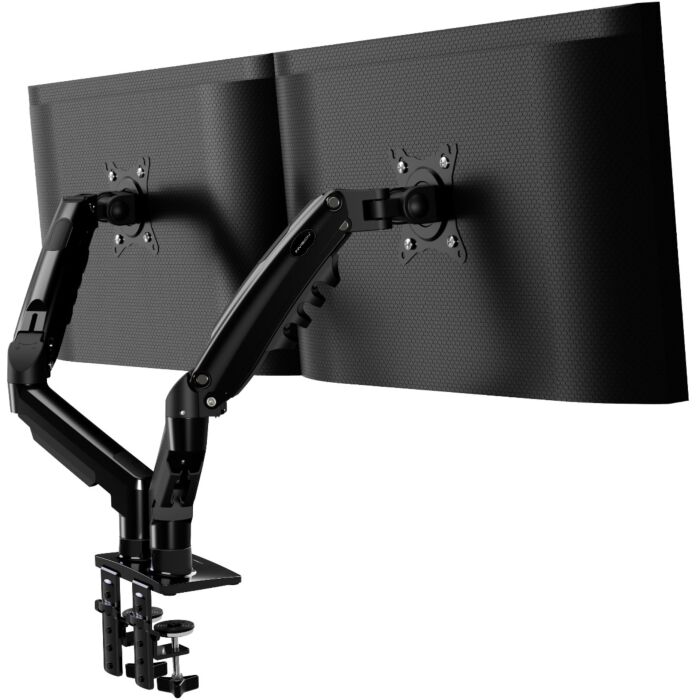
Pick 1 - Standard Home-Office Pair (2–9kg each)
Invision MX400 New Base Dual Monitor Arm
Check price on AmazonAt a glance:Dual-monitor desks with two screens weighing between 2 kg and 9 kg each.
Trade-off:Printed manual diagram G lists 10-90 mm whereas diagram I lists 20-90 mm; conservative 20-90 mm overlap range applies.

Pick 2 - Lighter Home-Office Screens (1.5–8kg each)
Fellowes Platinum Series Dual Monitor Arm 8042501 Black
At a glance:Lighter dual-monitor setups (1.5-8 kg per screen).
Trade-off:Manual page 2 states 40 inches while dimension sheet specifies 32 inches; conservative 32 inch ceiling is recorded.
Official reference; not an affiliate buying link.
Compare all 4 picks
Pick 3 - Heavier Home-Office Screens (2–15kg each)
Invision MX900 Dual Monitor Arm
Check price on AmazonAt a glance:Dual monitors weighing 2-15 kg per screen on desks rated for clamp or through-desk loads.
Trade-off:Requires desk structure capable of supporting 2-15 kg per screen.
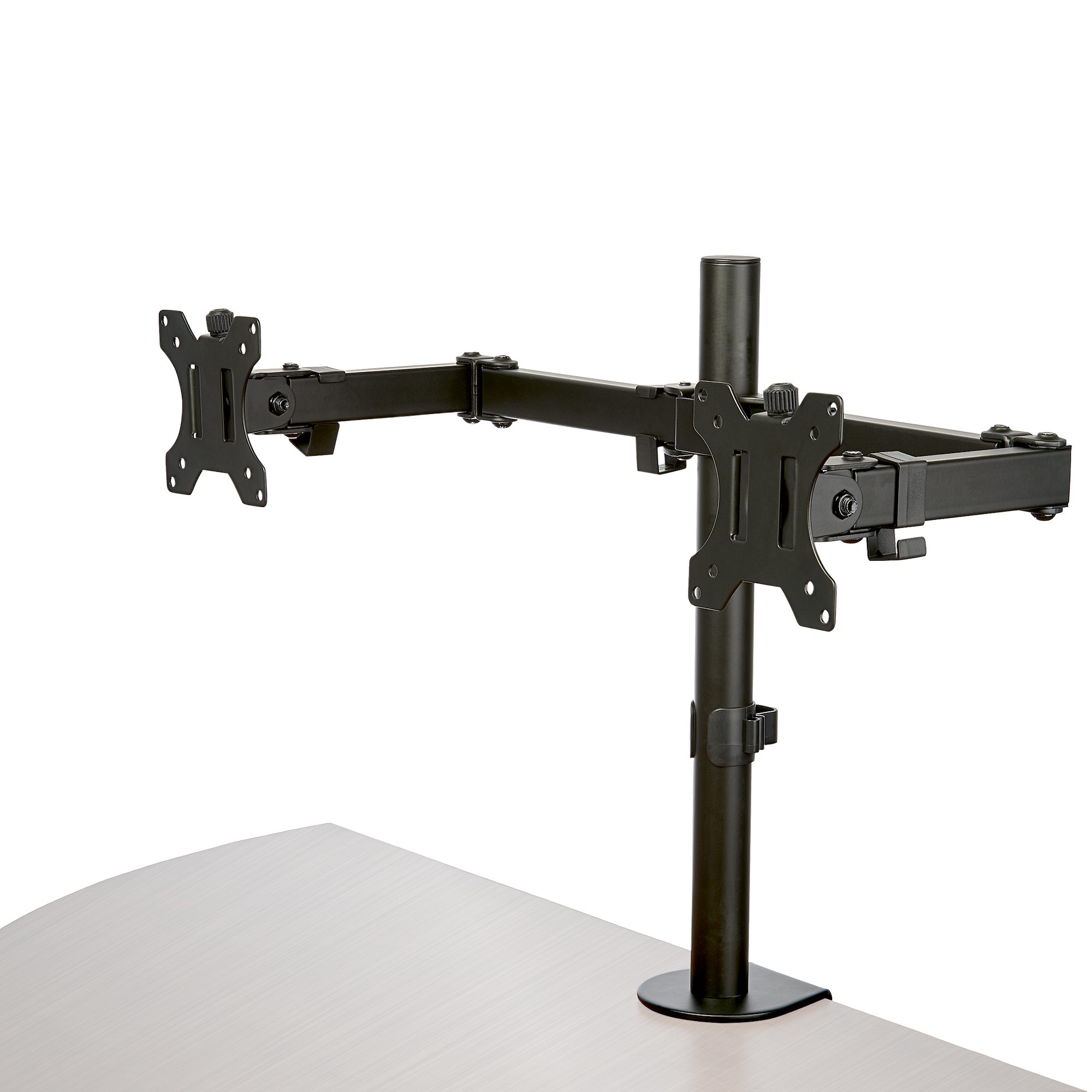
Pick 4 - Fixed-Pole Desk-Tidy Reference
StarTech ARMDUAL2 Fixed-Pole Articulating Dual Monitor Arm
At a glance:Set-and-adjust dual-monitor arrangements where frequent height adjustments are not needed.
Trade-off:Requires manual collar adjustment on pole to change vertical height.
Official reference; not an affiliate buying link.
Compare all 4 picksEveryday Technology Desk: before you choose: Check the exact device, port, app, operating-system and warranty fit before checkout.
Decision checks: device and port fit · portability · support and warranty
The shortlist
Four options, with the trade-offs visible
Use the fit, limitations and checkout checks before opening a retailer page. Confirm the current price, stock, delivery and returns with the retailer.
Pick 1
First comparison point
Standard Home-Office Pair (2–9kg each)
Invision MX400 New Base Dual Monitor Arm
Practical starting point for two 19-32 inch screens weighing 2 to 9 kg each, with independent gas-assisted movement and a conservative 20-90 mm mounting range. Check desktop support and underside clearance.
Affiliate retailer link. Check current price, stock, delivery and returns before buying.
Highlights
- Dual gas-assisted arms support two 19-32 inch screens weighing 2-9 kg each.
- Independent arm movement with 75 mm and 100 mm VESA compatibility.
Drawbacks
- Printed manual diagram G lists 10-90 mm whereas diagram I lists 20-90 mm; conservative 20-90 mm overlap range applies.
- Requires minimum 2 kg screen mass per arm to counterbalance spring tension.
Buyer fit
Best for
- Dual-monitor desks with two screens weighing between 2 kg and 9 kg each.
Not for you if
- Monitors under 2 kg or over 9 kg, or desk mounting setups outside 20-90 mm thickness.
Check before buying
- Weigh each monitor without its factory stand (2-9 kg range) and confirm VESA pattern (75x75 or 100x100 mm).
- Measure desk thickness (20-90 mm), check desktop manufacturer load guidance, and confirm underside access before fitting.
Pick 2
Lighter Home-Office Screens (1.5–8kg each)
Fellowes Platinum Series Dual Monitor Arm 8042501 Black
Reference option for two lighter screens from 1.5 to 8 kg each, with dual clamp brackets and VESA 75/100 mm. Use the dimension sheet's conservative 32 inch ceiling.
Highlights
- Gas counterbalance supports lighter monitors from 1.5 kg to 8 kg per display.
- Dual clamp position brackets cover 10-55 mm and 50-85 mm desk thicknesses.
Drawbacks
- Manual page 2 states 40 inches while dimension sheet specifies 32 inches; conservative 32 inch ceiling is recorded.
- Requires securing arm to desk before mounting displays.
Buyer fit
Best for
- Lighter dual-monitor setups (1.5-8 kg per screen).
Not for you if
- Monitors over 8 kg or screens under 1.5 kg, or unverified USB pass-through expectations.
Check before buying
- Weigh each monitor without stand (1.5-8 kg range) and confirm VESA pattern (75x75 or 100x100 mm).
- Confirm supplied revision, measure desk thickness (10-55 / 50-85 mm clamp, 10-85 mm grommet), and check underside clearance.
Pick 3
Heavier Home-Office Screens (2–15kg each)
Invision MX900 Dual Monitor Arm
Gas-assisted option for two 24-35 inch screens weighing 2 to 15 kg each. Its higher potential combined load makes desktop construction and fitting guidance decisive.
Affiliate retailer link. Check current price, stock, delivery and returns before buying.
Highlights
- Supports heavier dual screens from 2 kg to 15 kg per display (24-35 inches).
- Independent gas-assisted dual arms with VESA 75/100 mm compatibility.
Drawbacks
- Requires desk structure capable of supporting 2-15 kg per screen.
- Not suitable for lightweight screens under 2 kg per arm.
Buyer fit
Best for
- Dual monitors weighing 2-15 kg per screen on desks rated for clamp or through-desk loads.
Not for you if
- Monitors under 2 kg or over 15 kg, or desk mounting setups outside specified clamp/through-desk limits.
Check before buying
- Weigh each monitor without stand (2-15 kg range) and confirm VESA pattern (75x75 or 100x100 mm).
- Verify desk thickness and check desktop manufacturer suitability guidance and instructions prior to installation.
Pick 4
Fixed-Pole Desk-Tidy Reference
StarTech ARMDUAL2 Fixed-Pole Articulating Dual Monitor Arm
Fixed-pole articulating comparison for two screens up to 8 kg each, useful for a stable set-and-adjust layout. It is less suitable when different users need frequent height changes.
Highlights
- Fixed-pole set-and-adjust dual mount for two screens up to 8 kg each.
- Wide clamp mounting range (10-88 mm) fits various desk thicknesses.
Drawbacks
- Requires manual collar adjustment on pole to change vertical height.
- Minimum screen weight is not specified by manufacturer.
Buyer fit
Best for
- Set-and-adjust dual-monitor arrangements where frequent height adjustments are not needed.
Not for you if
- Monitors over 8 kg or setups requiring instant fluid vertical height adjustment.
Check before buying
- Verify screen weight is 8 kg or under per monitor without stand and VESA pattern is 75x75 or 100x100 mm.
- Confirm required height and reach with seller/manufacturer, measure desk thickness (10-88 mm clamp, 10-75 mm grommet), and check underside clearance.
Top 4 comparison
Compare the useful differences, trade-offs and final checks side by side.
Before you compare
Check these first
- 1Weigh each screen without its original stand and confirm VESA 75x75 or 100x100 mm.
- 2Measure desktop thickness and inspect rear and underside clearances at the actual fixing point.
- 3Re-check exact model, included hardware, seller, condition, delivery and returns at checkout.
Your four roles
View specs & trade-offs
Trade-off:Printed manual diagram G lists 10-90 mm whereas diagram I lists 20-90 mm; conservative 20-90 mm overlap range applies.
Not ideal for:Monitors under 2 kg or over 9 kg, or desk mounting setups outside 20-90 mm thickness.
Check:Weigh each monitor without its factory stand (2-9 kg range) and confirm VESA pattern (75x75 or 100x100 mm).
Sources:Official product page: https://www.invisiontechnology.co.uk/monitor-arm-mx400.
View specs & trade-offs
Trade-off:Manual page 2 states 40 inches while dimension sheet specifies 32 inches; conservative 32 inch ceiling is recorded.
Not ideal for:Monitors over 8 kg or screens under 1.5 kg, or unverified USB pass-through expectations.
Check:Weigh each monitor without stand (1.5-8 kg range) and confirm VESA pattern (75x75 or 100x100 mm).
Sources:Official resources index binding MPN 8042501: https://www.fellowes.com/uk/en/catalog/workspace-ergonomics/resources/pg/downloads.
View specs & trade-offs
Trade-off:Requires desk structure capable of supporting 2-15 kg per screen.
Not ideal for:Monitors under 2 kg or over 15 kg, or desk mounting setups outside specified clamp/through-desk limits.
Check:Weigh each monitor without stand (2-15 kg range) and confirm VESA pattern (75x75 or 100x100 mm).
Sources:Official product page: https://www.invisiontechnology.co.uk/monitor-arm-mx900.
View specs & trade-offs
Trade-off:Requires manual collar adjustment on pole to change vertical height.
Not ideal for:Monitors over 8 kg or setups requiring instant fluid vertical height adjustment.
Check:Verify screen weight is 8 kg or under per monitor without stand and VESA pattern is 75x75 or 100x100 mm.
Sources:Official product datasheet: https://media.startech.com/cms/pdfs/armdual2_datasheet.pdf (SHA256: cd8a87bef1447d455bced01976c6aa2f5340afecd2827357c81fdacfe547a2de).
| Pick | Pick role | Best for | Avoid if | Key trade-off | Check before buying | Review/evidence basis | Retailer |
|---|---|---|---|---|---|---|---|
| 1. Invision MX400 New Base Dual Monitor Arm | Standard Home-Office Pair (2–9kg each) | Dual-monitor desks with two screens weighing between 2 kg and 9 kg each. | Monitors under 2 kg or over 9 kg, or desk mounting setups outside 20-90 mm thickness. | Printed manual diagram G lists 10-90 mm whereas diagram I lists 20-90 mm; conservative 20-90 mm overlap range applies. | Weigh each monitor without its factory stand (2-9 kg range) and confirm VESA pattern (75x75 or 100x100 mm). | Official product page: https://www.invisiontechnology.co.uk/monitor-arm-mx400 | Check current price |
| 2. Fellowes Platinum Series Dual Monitor Arm 8042501 Black | Lighter Home-Office Screens (1.5–8kg each) | Lighter dual-monitor setups (1.5-8 kg per screen). | Monitors over 8 kg or screens under 1.5 kg, or unverified USB pass-through expectations. | Manual page 2 states 40 inches while dimension sheet specifies 32 inches; conservative 32 inch ceiling is recorded. | Weigh each monitor without stand (1.5-8 kg range) and confirm VESA pattern (75x75 or 100x100 mm). | Official resources index binding MPN 8042501: https://www.fellowes.com/uk/en/catalog/workspace-ergonomics/resources/pg/downloads | No retailer link |
| 3. Invision MX900 Dual Monitor Arm | Heavier Home-Office Screens (2–15kg each) | Dual monitors weighing 2-15 kg per screen on desks rated for clamp or through-desk loads. | Monitors under 2 kg or over 15 kg, or desk mounting setups outside specified clamp/through-desk limits. | Requires desk structure capable of supporting 2-15 kg per screen. | Weigh each monitor without stand (2-15 kg range) and confirm VESA pattern (75x75 or 100x100 mm). | Official product page: https://www.invisiontechnology.co.uk/monitor-arm-mx900 | Check retailer price |
| 4. StarTech ARMDUAL2 Fixed-Pole Articulating Dual Monitor Arm | Fixed-Pole Desk-Tidy Reference | Set-and-adjust dual-monitor arrangements where frequent height adjustments are not needed. | Monitors over 8 kg or setups requiring instant fluid vertical height adjustment. | Requires manual collar adjustment on pole to change vertical height. | Verify screen weight is 8 kg or under per monitor without stand and VESA pattern is 75x75 or 100x100 mm. | Official product datasheet: https://media.startech.com/cms/pdfs/armdual2_datasheet.pdf (SHA256: cd8a87bef1447d455bced01976c6aa2f5340afecd2827357c81fdacfe547a2de). | No retailer link |
Choose this if / Avoid this if
Rule out poor-fit options before comparing finer details.
Avoid if
- Skip an arm if either monitor falls outside its documented weight, size or VESA limits.
- Skip clamp or grommet installation where desk construction, underside access or rental constraints make it unsuitable.
- Skip this guide if you need a universal-fit, professional-installation or durability guarantee.
Dealbreakers
- The seller listing does not match the exact model or ASIN.
- The desktop cannot safely take a concentrated clamp or through-desk load.
- Required screen positions exceed the documented arm geometry or available rear clearance.
Check before buying
- Weigh each screen without its original stand and confirm VESA 75x75 or 100x100 mm.
- Measure desktop thickness and inspect rear and underside clearances at the actual fixing point.
- Re-check exact model, included hardware, seller, condition, delivery and returns at checkout.
Choose another shortlist if
- You use one monitor or an ultrawide outside these product limits.
- Your landlord or desk warranty prevents clamp or grommet mounting.
- You need a freestanding or wall-mounted arrangement.
Detailed buyer guidance
A monitor arm can reclaim the footprint occupied by factory stands, but it moves load to a small part of the desktop. Check the desk before choosing the arm: material, edge shape, thickness, underside rails and rear clearance can matter more than a long feature list.
Why MX400 is the home-office starting point
The Invision MX400 New Base supports two 19-32 inch screens weighing 2-9 kg each, with independent gas-assisted arms and VESA 75/100 mm mounting. We apply a conservative 20-90 mm mounting range because two diagrams in its manual differ. Its exact Amazon UK ASIN was checked on 12 September 2026; current seller and offer terms still need checking before payment.
Match the alternative to the constraint
- Fellowes 8042501 reaches down to 1.5 kg per screen, making it the documented reference for lighter displays.
- MX900 covers heavier 24-35 inch screens from 2-15 kg each, subject to desktop load suitability.
- StarTech ARMDUAL2 suits a layout that can be set on a fixed pole and adjusted only occasionally.
Home-office checks before paying
Weigh both displays without their stands. Confirm VESA pattern, total side-by-side width and required reach. Measure the actual mounting point and check for cable trays, drawers or structural rails underneath. Follow the supplied instructions and do not infer load suitability from thickness alone.
Buying-action boundary
Only MX400 and MX900 have exact commission-paying Amazon UK actions in this cohort. The exact StarTech and Fellowes links remain non-affiliate product references and are not presented as buying buttons.
When another role fits better
The first option is a useful starting point, not a universal winner. Move another role ahead when its use case, fit or ownership trade-offs match you better.
Known limitations
UK Shortlists has not hands-on tested these arms; this page uses documented specifications and restrained fit guidance.
How we chose
The checks behind the four picks
We compared exact dual-arm models by screen-weight fit, adjustment style, desk mounting limits and home-office setup friction, without live price or universal-fit claims.
- Step 1: Net per-screen weight, VESA pattern and two-screen clearance
- Step 2: Desk thickness, material, rear clearance and underside obstructions
- Step 3: Frequent gas-assisted movement versus fixed-pole set-and-adjust use
- Step 4: Exact official product identity and approved manufacturer imagery
- Step 5: Documented mounting and adjustment trade-offs for a shared home-office desk
Disclosure
Last reviewed: 12/09/2026
UK Shortlists may earn a commission when you use some retailer links. This does not increase the price you pay.
As an Amazon Associate we earn from qualifying purchases.
Retailers cannot pay to change which products we recommend or their order.
Prices, stock, delivery and returns can change. Confirm the final details with the retailer before buying.
Read more about how UK Shortlists makes money, retailer checks, and how corrections are handled.
Who checked this shortlist?
- Written / compiled by:
- Everyday Technology Desk
- Reviewed by:
- UK Shortlists Editorial Team
- Last reviewed:
- 12/09/2026
- Review basis:
- Criteria-based comparison
We compare published product information, retailer details and the buying criteria shown above. UK Shortlists does not currently publish claims based on first-party product use, laboratory testing or long-term testing.
FAQs & alternatives
Will a monitor arm fit any home-office desk?
No. Measure thickness, inspect underside access and confirm the desk maker permits the concentrated mounting load.
Which option fits two heavier monitors?
MX900 documents 2-15 kg per screen for 24-35 inch displays, but the desk must also support the greater combined load.
Are the StarTech and Fellowes references affiliate links?
No. They are exact non-affiliate references retained for comparison; only the clearly labelled Amazon UK actions are commission-paying.
Also consider
- Keep original stands where drilling, clamping or concentrated loads are unsuitable.
- Use two independent arms if screens differ materially in mass or need wide separation.
- Choose a single-arm-specific route for a one-screen setup.
Newsletter
Want the next useful buying check?
Get occasional UK Shortlists updates for decisions like this. Unsubscribe at any time.
Related shortlists
- Best Curved Monitors for Home Offices in the UK (2026)
Use this related shortlist to compare trade-offs before finalising your Top 4 pick.
- Best Monitors with Height-Adjustable Stands in the UK (2026)
Use this related shortlist to compare trade-offs before finalising your Top 4 pick.
- Best IPS Monitors with QHD Resolution in the UK (2026)
Use this related shortlist to compare trade-offs before finalising your Top 4 pick.
- Best Monitor Arms for Standing Desk Conversions in the UK (2026)
Use this related shortlist to compare trade-offs before finalising your Top 4 pick.
- Best IPS Black Monitors in the UK (2026)
Use this related shortlist to compare trade-offs before finalising your Top 4 pick.
- Best Monitors 24 Inches and Smaller in the UK (2026)
Use this related shortlist to compare trade-offs before finalising your Top 4 pick.