
Back to Home Networking & Wi-Fi
UK buying shortlist
Best Mesh Wi-Fi for Virgin Media Users in the UK (2026): Hub Mode Checks
Written by Home Technology Desk Home technology editorial desk · Home Networking & Wi-Fi beat · reviewed 27/08/2026
Four exact current UK three-node mesh configurations compared for Virgin Media hub handoff, router or access-point mode, port topology and backhaul planning. this guide does not promise compatibility, speed or coverage, and Hub 5x must not be treated as modem-mode capable while Virgin Media says it is unavailable.
Quick answer · Top 4
Compare all four options
Open a product to review its fit, limitations and buying checks before choosing a retailer.
_Overview_01_large_20211130005802o.jpg)
Pick 1 - Best explicit mode-and-port baseline
TP-Link Deco X55 — 3-pack — B0B8F146PQ
At a glance:Buyers comparing a source-bound three-node mesh topology.
Trade-off:Published coverage, port and backhaul specifications do not establish real-home speed, range or reliability.
Official reference; not an affiliate buying link.
Compare all 4 picks
Pick 2 - Best access-point-mode alternative
MERCUSYS Halo H80X V1 — 3-pack — B0B2RQR96Y
At a glance:Buyers comparing a source-bound three-node mesh topology.
Trade-off:Published coverage, port and backhaul specifications do not establish real-home speed, range or reliability.
Official reference; not an affiliate buying link.
Compare all 4 picks_Overview_01_large_20211224063459s.jpg)
Pick 3 - Best closely matched Deco alternative
TP-Link Deco X50 — 3-pack — B09MFWNYC3
At a glance:Buyers comparing a source-bound three-node mesh topology.
Trade-off:Published coverage, port and backhaul specifications do not establish real-home speed, range or reliability.
Official reference; not an affiliate buying link.
Compare all 4 picks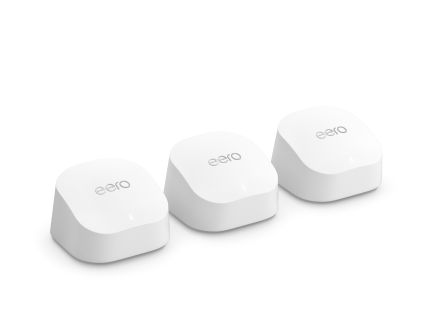
Pick 4 - Best documented bridge-mode alternative
Amazon eero 6+ — 3-pack — B08ZK15LWW
At a glance:Buyers comparing a source-bound three-node mesh topology.
Trade-off:Published coverage, port and backhaul specifications do not establish real-home speed, range or reliability.
Official reference; not an affiliate buying link.
Compare all 4 picksHome Technology Desk: before you choose: Check the exact connection, account, mounting or installation requirement before opening a retailer link.
Decision checks: compatibility · setup and accounts · realistic use context
Compare the four configurations and rule out a poor fit before choosing a retailer.
Compare all fourThe shortlist
Four options, with the trade-offs visible
Use the fit, limitations and checkout checks before opening a retailer page. Confirm the current price, stock, delivery and returns with the retailer.
Pick 1
First comparison point
Best explicit mode-and-port baseline
TP-Link Deco X55 — 3-pack — B0B8F146PQ
the official specification lists Router and Access Point operation modes; the product page publishes three Gigabit ports per unit and optional Ethernet backhaul. This is published-specification evidence, not a coverage or performance guarantee.
Highlights
- Exact 3-pack identity with official product, image and route evidence.
Drawbacks
- Published coverage, port and backhaul specifications do not establish real-home speed, range or reliability.
Buyer fit
Best for
- Buyers comparing a source-bound three-node mesh topology.
Not for you if
- Buyers who need guaranteed whole-home coverage or measured performance.
Check before buying
- Confirm B0B8F146PQ, three units, current seller, cable path, modem or ONT handoff, app requirements, warranty and returns.
Pick 2
Best access-point-mode alternative
MERCUSYS Halo H80X V1 — 3-pack — B0B2RQR96Y
the official specification lists Router and Access Point operation modes; the exact 3-pack datasheet publishes optional Gigabit Ethernet backhaul and three Gigabit ports per unit. This is published-specification evidence, not a coverage or performance guarantee.
Highlights
- Exact 3-pack identity with official product, image and route evidence.
Drawbacks
- Published coverage, port and backhaul specifications do not establish real-home speed, range or reliability.
Buyer fit
Best for
- Buyers comparing a source-bound three-node mesh topology.
Not for you if
- Buyers who need guaranteed whole-home coverage or measured performance.
Check before buying
- Confirm B0B2RQR96Y, three units, current seller, cable path, modem or ONT handoff, app requirements, warranty and returns.
Pick 3
Best closely matched Deco alternative
TP-Link Deco X50 — 3-pack — B09MFWNYC3
the official specification lists Router and Access Point operation modes; the product page publishes three Gigabit ports per unit and optional Ethernet backhaul. This is published-specification evidence, not a coverage or performance guarantee.
Highlights
- Exact 3-pack identity with official product, image and route evidence.
Drawbacks
- Published coverage, port and backhaul specifications do not establish real-home speed, range or reliability.
Buyer fit
Best for
- Buyers comparing a source-bound three-node mesh topology.
Not for you if
- Buyers who need guaranteed whole-home coverage or measured performance.
Check before buying
- Confirm B09MFWNYC3, three units, current seller, cable path, modem or ONT handoff, app requirements, warranty and returns.
Pick 4
Best documented bridge-mode alternative
Amazon eero 6+ — 3-pack — B08ZK15LWW
official support documents Automatic routing and Bridge mode, with feature limits when bridged; official support documents two auto-sensing 1 GbE ports and explicitly supports Ethernet backhaul between eeros. This is published-specification evidence, not a coverage or performance guarantee.
Highlights
- Exact 3-pack identity with official product, image and route evidence.
Drawbacks
- Published coverage, port and backhaul specifications do not establish real-home speed, range or reliability.
Buyer fit
Best for
- Buyers comparing a source-bound three-node mesh topology.
Not for you if
- Buyers who need guaranteed whole-home coverage or measured performance.
Check before buying
- Confirm B08ZK15LWW, three units, current seller, cable path, modem or ONT handoff, app requirements, warranty and returns.
Top 4 comparison
Compare the useful differences, trade-offs and final checks side by side.
Before you compare
Check these first
- 1Confirm the exact model identity and three-unit bundle.
- 2Draw the gateway, node, switch and wall-outlet topology.
- 3Check WAN-port use, remaining LAN ports and cable category for every link.
Your four roles
View specs & trade-offs
Trade-off:Published coverage, port and backhaul specifications do not establish real-home speed, range or reliability.
Not ideal for:Buyers who need guaranteed whole-home coverage or measured performance.
Check:Confirm B0B8F146PQ, three units, current seller, cable path, modem or ONT handoff, app requirements, warranty and returns.
Warranty and support:Confirm current UK warranty and returns for exact ASIN B0B8F146PQ. • Official configuration, image and exact UK destination checked 2026-08-27.
Sources:https://www.tp-link.com/uk/home-networking/deco/deco-x55/.
View specs & trade-offs
Trade-off:Published coverage, port and backhaul specifications do not establish real-home speed, range or reliability.
Not ideal for:Buyers who need guaranteed whole-home coverage or measured performance.
Check:Confirm B0B2RQR96Y, three units, current seller, cable path, modem or ONT handoff, app requirements, warranty and returns.
Warranty and support:Confirm current UK warranty and returns for exact ASIN B0B2RQR96Y. • Official configuration, image and exact UK destination checked 2026-08-27.
Sources:https://www.mercusys.com/uk/product/mesh/halo-h80x/v1/3-pack/.
View specs & trade-offs
Trade-off:Published coverage, port and backhaul specifications do not establish real-home speed, range or reliability.
Not ideal for:Buyers who need guaranteed whole-home coverage or measured performance.
Check:Confirm B09MFWNYC3, three units, current seller, cable path, modem or ONT handoff, app requirements, warranty and returns.
Warranty and support:Confirm current UK warranty and returns for exact ASIN B09MFWNYC3. • Official configuration, image and exact UK destination checked 2026-08-27.
Sources:https://www.tp-link.com/uk/home-networking/deco/deco-x50/.
View specs & trade-offs
Trade-off:Published coverage, port and backhaul specifications do not establish real-home speed, range or reliability.
Not ideal for:Buyers who need guaranteed whole-home coverage or measured performance.
Check:Confirm B08ZK15LWW, three units, current seller, cable path, modem or ONT handoff, app requirements, warranty and returns.
Warranty and support:Confirm current UK warranty and returns for exact ASIN B08ZK15LWW. • Official configuration, image and exact UK destination checked 2026-08-27.
Sources:https://eero.com/en-GB/shop/eero-6-plus/buy.
| Pick | Pick role | Best for | Avoid if | Key trade-off | Check before buying | Warranty/support status | Review/evidence basis |
|---|---|---|---|---|---|---|---|
| 1. TP-Link Deco X55 — 3-pack — B0B8F146PQ | Best explicit mode-and-port baseline | Buyers comparing a source-bound three-node mesh topology. | Buyers who need guaranteed whole-home coverage or measured performance. | Published coverage, port and backhaul specifications do not establish real-home speed, range or reliability. | Confirm B0B8F146PQ, three units, current seller, cable path, modem or ONT handoff, app requirements, warranty and returns. | Confirm current UK warranty and returns for exact ASIN B0B8F146PQ. • Official configuration, image and exact UK destination checked 2026-08-27. | https://www.tp-link.com/uk/home-networking/deco/deco-x55/ |
| 2. MERCUSYS Halo H80X V1 — 3-pack — B0B2RQR96Y | Best access-point-mode alternative | Buyers comparing a source-bound three-node mesh topology. | Buyers who need guaranteed whole-home coverage or measured performance. | Published coverage, port and backhaul specifications do not establish real-home speed, range or reliability. | Confirm B0B2RQR96Y, three units, current seller, cable path, modem or ONT handoff, app requirements, warranty and returns. | Confirm current UK warranty and returns for exact ASIN B0B2RQR96Y. • Official configuration, image and exact UK destination checked 2026-08-27. | https://www.mercusys.com/uk/product/mesh/halo-h80x/v1/3-pack/ |
| 3. TP-Link Deco X50 — 3-pack — B09MFWNYC3 | Best closely matched Deco alternative | Buyers comparing a source-bound three-node mesh topology. | Buyers who need guaranteed whole-home coverage or measured performance. | Published coverage, port and backhaul specifications do not establish real-home speed, range or reliability. | Confirm B09MFWNYC3, three units, current seller, cable path, modem or ONT handoff, app requirements, warranty and returns. | Confirm current UK warranty and returns for exact ASIN B09MFWNYC3. • Official configuration, image and exact UK destination checked 2026-08-27. | https://www.tp-link.com/uk/home-networking/deco/deco-x50/ |
| 4. Amazon eero 6+ — 3-pack — B08ZK15LWW | Best documented bridge-mode alternative | Buyers comparing a source-bound three-node mesh topology. | Buyers who need guaranteed whole-home coverage or measured performance. | Published coverage, port and backhaul specifications do not establish real-home speed, range or reliability. | Confirm B08ZK15LWW, three units, current seller, cable path, modem or ONT handoff, app requirements, warranty and returns. | Confirm current UK warranty and returns for exact ASIN B08ZK15LWW. • Official configuration, image and exact UK destination checked 2026-08-27. | https://eero.com/en-GB/shop/eero-6-plus/buy |
Choose this if / Avoid this if
Rule out poor-fit options before comparing finer details.
Avoid if
- You need a published area figure to guarantee coverage, speed or capacity in your home.
- The cable path, switch topology, modem or ONT handoff, node locations or power sockets are unresolved.
- The exact model, 3-pack bundle, app support, warranty, seller or return route cannot be confirmed.
Dealbreakers
- The listing is a 1-pack, 2-pack, extender-only unit or a sibling model.
- A required room can only be reached by an unplanned weak wireless hop.
- Ethernet backhaul would require an unsafe, prohibited or impractical cable route.
Check before buying
- Confirm the exact model identity and three-unit bundle.
- Draw the gateway, node, switch and wall-outlet topology.
- Check WAN-port use, remaining LAN ports and cable category for every link.
- Record thick walls, dense floors, insulation, metalwork, underfloor heating and extensions.
- Confirm ISP router or bridge mode, app, account, Wi-Fi and firmware requirements.
- Recheck the current seller, delivery, warranty and returns.
Choose another shortlist if
- A single router or 2-pack is enough for the measured layout.
- You require multi-gigabit ports, PoE, outdoor-rated nodes or business network controls.
- The cable route or building layout needs a specialist installer or site survey.
Detailed buyer guidance
Start with the building and cable path
Identify the exact Virgin Media Hub before choosing a topology. Virgin Media currently documents modem mode for Hub 3, 4 and 5, while explicitly stating that it is not currently available for Hub 5x. Decide whether the Virgin hub or the mesh will own routing, DHCP and network services, then trace the single gateway connection and every backhaul link before changing any setting.
Virgin Media hub-mode boundary
Virgin Media currently documents modem mode for Hub 3, Hub 4 and Hub 5, but states that it is not currently available for Hub 5x. Modem mode also disables listed Virgin hub functions, including Intelligent WiFi and parts of the Connect app. Confirm the exact hub, current Virgin guidance and the services you rely on before changing mode. Do not assume Hub 5 and Hub 5x have the same capability.
If the Virgin hub remains the router, use only a mesh mode that the manufacturer documents for an upstream router and confirm which advanced features are reduced or disabled. If the Virgin hub enters modem mode, one mesh node becomes the gateway router and must be connected using the documented hub port and boot sequence. Avoid accidental double NAT by deciding which device owns routing before setup.
Why the first pick leads
Deco X55 is the starting point because its official specification lists Router and Access Point modes, optional Ethernet backhaul and three Gigabit ports per unit. The right operating mode still depends on the exact Virgin Media Hub and network plan; this is not a compatibility or performance guarantee.
What each official source establishes
- Best explicit mode-and-port baseline — TP-Link Deco X55 3-pack: the official specification lists Router and Access Point operation modes; the product page publishes three Gigabit ports per unit and optional Ethernet backhaul. The source establishes the configuration and published fact, not real-home coverage, throughput or reliability.
- Best access-point-mode alternative — MERCUSYS Halo H80X V1 3-pack: the official specification lists Router and Access Point operation modes; the exact 3-pack datasheet publishes optional Gigabit Ethernet backhaul and three Gigabit ports per unit. The source establishes the configuration and published fact, not real-home coverage, throughput or reliability.
- Best closely matched Deco alternative — TP-Link Deco X50 3-pack: the official specification lists Router and Access Point operation modes; the product page publishes three Gigabit ports per unit and optional Ethernet backhaul. The source establishes the configuration and published fact, not real-home coverage, throughput or reliability.
- Best documented bridge-mode alternative — Amazon eero 6+ 3-pack: official support documents Automatic routing and Bridge mode, with feature limits when bridged; official support documents two auto-sensing 1 GbE ports and explicitly supports Ethernet backhaul between eeros. The source establishes the configuration and published fact, not real-home coverage, throughput or reliability.
Plan the topology before choosing the kit
Draw the modem or ONT, the gateway node, every satellite node, switches, wired devices and wall outlets. A three-pack can support three placement points, but it does not decide whether nodes should be wired, placed around a stairwell or separated across an extension. Avoid assuming that a satellite can relay through several dense floors just because the published area appears large enough. If Ethernet is possible, trace the complete cable path and note where fire stopping, landlord consent, external routing or a professional installer may be required.
Treat building materials as a primary input
Brick, blockwork, reinforced concrete, metal lath, foil-backed insulation, mirrors, tanks, appliances and underfloor heating can change radio paths. So can neighbouring networks and the position of client devices. Record problem rooms and the materials between them. Manufacturer coverage figures are useful for eliminating obviously small systems, but they are not a substitute for a layout plan or a return route if the result is poor.
Check the Ethernet-backhaul chain
Confirm which node connects to the modem or ONT and which physical port becomes WAN. Then count the ports left for local devices and backhaul. Check that switches pass the traffic required by the mesh system, that existing cables terminate correctly, and that long runs are not damaged or routed alongside avoidable interference. A Gigabit label is a port ceiling, not a promise that internet traffic or each wireless client will reach that rate.
Keep the eero boundary conservative
The current eero UK page contains two conflicting 3-pack coverage statements. This shortlist uses the lower 420 m² / 75+ device statement and does not repeat the higher secondary wording as established fact. That conservative choice avoids manufacturing precision from a conflicting page; it still does not guarantee usable coverage in a particular home.
App, firmware and service checks
Confirm phone-platform support, account requirements, update behaviour, parental-control boundaries and which features require an optional service. Set up the mesh while you still have access to the existing router and recovery details. After any firmware, router-mode or node-position change, recheck wired-link status and walk through the rooms that drove the purchase. This page does not claim that a feature label remains unchanged indefinitely.
Before checkout
Confirm the exact model identity and three-unit pack, modem or ONT handoff, ISP router or bridge mode, node positions, power sockets, Ethernet runs, switch model, port count, included cables, app requirements, warranty and return terms. Recheck the current source destination, delivery and bundle details. Stop if the decision requires a coverage guarantee, a live-price assumption or an unsafe cable route.
Known limitations
This is desk-based buyer guidance using current official pages, official support records, exact official images and current exact UK destinations. It does not measure radio coverage, latency, roaming, throughput, firmware reliability, subscription value or installation quality. The four products are a deliberately evidence-complete cohort, not a claim to cover the whole UK market.
What would change this recommendation
The recommendation would change if the exact Virgin hub cannot use the planned modem, router, access-point or bridge arrangement, if required Virgin hub services would be lost, or if the network needs multi-gigabit ports or controls absent from the chosen system.
When another role fits better
The first option is a useful starting point, not a universal winner. Move another role ahead when its use case, fit or ownership trade-offs match you better.
How we chose
The checks behind the four picks
Check the product details, limitations and retailer terms before deciding.
- Step 1: Exact current UK 3-pack identity and official image linkage
- Step 2: Manufacturer-published coverage boundary with environment caveats retained
- Step 3: Product-bound Ethernet port and backhaul evidence
- Step 4: Practical node topology, cable path, ISP handoff and building-material checks
- Step 5: Editorial role fit without price, commission, rating or stock ranking
Disclosure
Last reviewed: 27/08/2026
UK Shortlists may earn a commission when you use some retailer links. This does not increase the price you pay.
As an Amazon Associate we earn from qualifying purchases.
Retailers cannot pay to change which products we recommend or their order.
Prices, stock, delivery and returns can change. Confirm the final details with the retailer before buying.
Read more about how UK Shortlists makes money, retailer checks, and how corrections are handled.
Who checked this shortlist?
- Written / compiled by:
- Home Technology Desk
- Reviewed by:
- UK Shortlists Editorial Team
- Last reviewed:
- 27/08/2026
- Review basis:
- Criteria-based comparison
We compare published product information, retailer details and the buying criteria shown above. UK Shortlists does not currently publish claims based on first-party product use, laboratory testing or long-term testing.
FAQs & alternatives
Does this page guarantee whole-home coverage?
No. Manufacturer areas are screening evidence only. Building materials, floors, interference, placement, cable routes, client devices and broadband service can change the result.
Does Ethernet backhaul guarantee faster Wi-Fi?
No. It can provide a wired path between nodes, but the result still depends on cable quality, switch topology, port negotiation, internet service, client devices and configuration.
Does this page claim first-party-use or laboratory verification?
No. This page is a desk-based shortlist built from product records, published specifications, and source notes. It does not claim UK Shortlists hands-on use or laboratory verification.
Also consider
- Use the broader mesh Wi-Fi route if the building constraint is not yet clear.
- Use a router route if one well-placed access point can cover the measured space.
- Defer purchase until the cable path, node positions and exact bundle are confirmed.
Newsletter
Want the next useful buying check?
Get occasional UK Shortlists updates for decisions like this. Unsubscribe at any time.
Related shortlists
- Best Mesh Wi-Fi for Large Houses in the UK (2026)
Use this if whole-home coverage stability matters more than single-router simplicity.
- Best Mesh Systems for Thick Walls in the UK (2026)
Use this if whole-home coverage stability matters more than single-router simplicity.
- Best Mesh Wi-Fi for Video Calls in the UK (2026)
Use this if whole-home coverage stability matters more than single-router simplicity.
- Best Mesh Wi-Fi Systems for Thick-Wall Houses in the UK (2026)
Use this if whole-home coverage stability matters more than single-router simplicity.
- Best Mesh Wi-Fi for Three-Storey Homes in the UK (2026)
Use this if whole-home coverage stability matters more than single-router simplicity.
- Best Mesh Wi-Fi with Ethernet Backhaul in the UK (2026)
Use this if whole-home coverage stability matters more than single-router simplicity.