
Back to Mobile & Everyday Tech
UK buying shortlist
Best 100W GaN USB-C Chargers in the UK (2026)
Written by Everyday Technology Desk Everyday technology editorial desk · Mobile & Everyday Tech beat · reviewed 07/08/2026
Choose a 100W USB-C wall charger by port layout, device requirements and cable power ratings rather than marketplace titles.
Quick answer · Top 4
Compare all four options
Affiliate links may earn commission. Check current price, stock, delivery, returns and fit on the retailer page before buying.
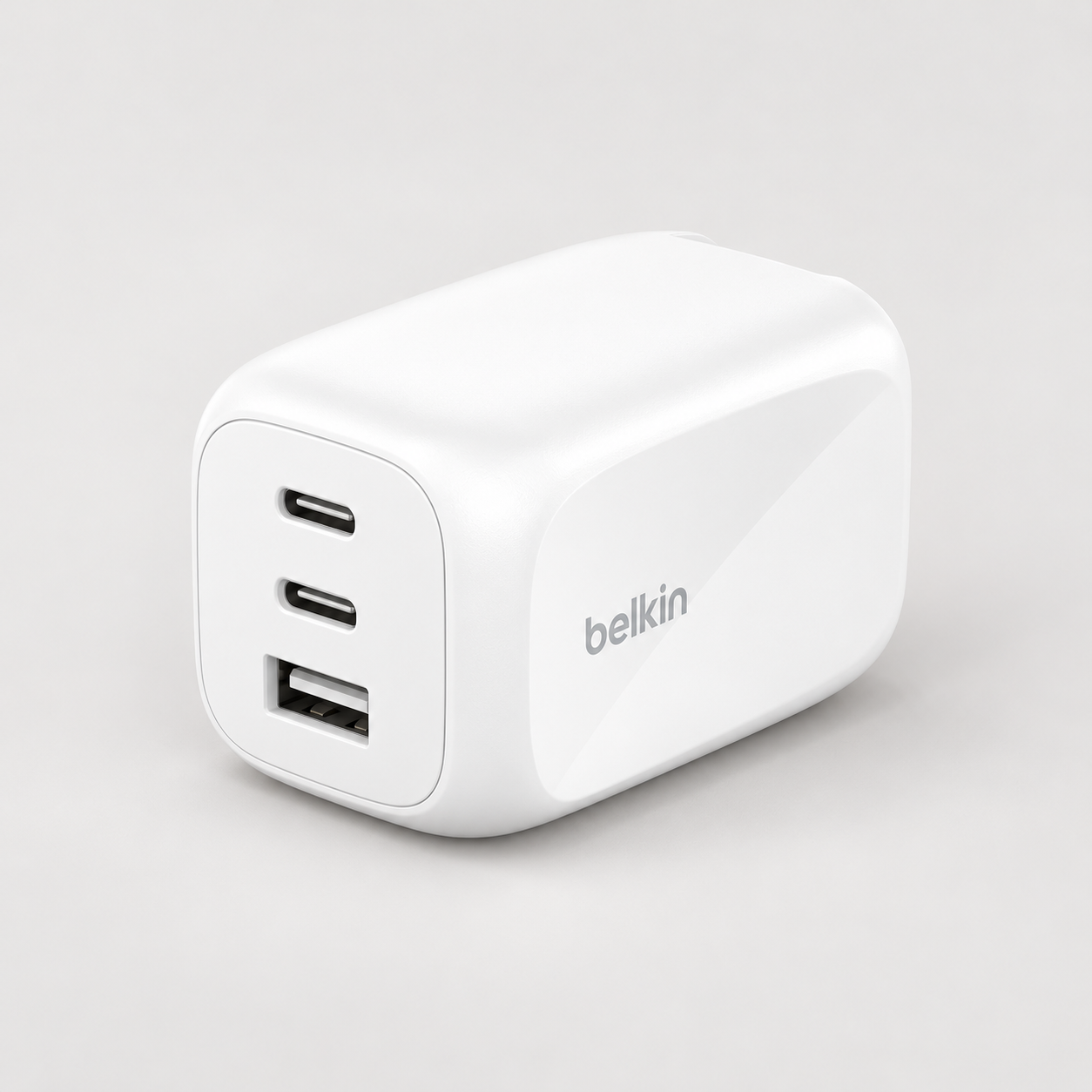
Pick 1 - Travel Plug Kit Format
Belkin BoostCharge Pro 100W 3-Port GaN Charger WCH016hqWH
Check price on AmazonAt a glance:Buyers who want a documented UK-travel-capable 100W charger for a laptop and two smaller devices.
Trade-off:Total output is shared across connected devices; verify the maker's current allocation table for your laptop and accessories.
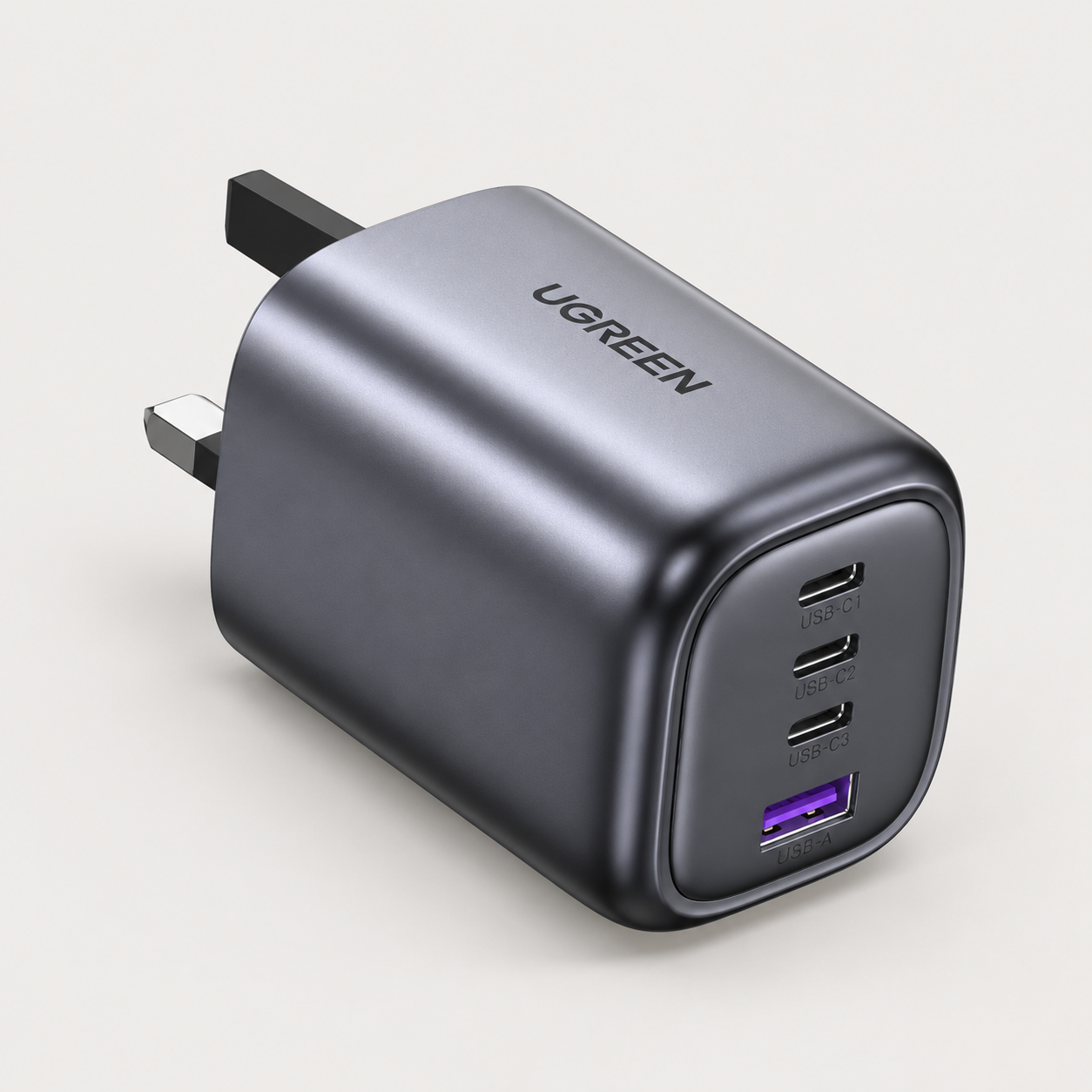
Pick 2 - Four-Port Desk Charger
UGREEN Nexode 100W 4-Port GaN Charger 40749
Check price on AmazonAt a glance:A desk or travel kit that needs one 100W charger to cover several devices after port allocation is checked.
Trade-off:The four-port layout is not a guarantee that every connected device receives its maximum individual wattage.
Pick 3 - Smart Display Allocation Guide
Anker 100W 3-Port Smart Display Charger A121B
Check price on AmazonAt a glance:Buyers who want to verify three-port power distribution for a known laptop-and-accessories setup.
Trade-off:A smart display and multi-port features add little value if you only charge one low-power device.
Pick 4 - Five-Port Charging Point
UGREEN Nexode 100W 5-Port GaN Charger X563
Check price on AmazonAt a glance:A shared desk or household charging point where port count is the primary constraint.
Trade-off:More ports increase the importance of checking output distribution and the exact device-and-cable mix.
Everyday Technology Desk: before you choose: Check the exact device, port, app, operating-system and warranty fit before checkout.
Decision checks: device and port fit · portability · support and warranty
The shortlist
Four options, with the trade-offs visible
Use the fit, limitations and checkout checks before opening a retailer page. Confirm the current price, stock, delivery and returns with the retailer.
Pick 1
Travel Plug Kit Format
Belkin BoostCharge Pro 100W 3-Port GaN Charger WCH016hqWH
A three-port 100W wall charger with UK and EU interchangeable plug tips. Belkin FAQ 337490 documents up to 60W top USB-C, 22W middle USB-C, and 18W USB-A when all three ports charge simultaneously.
Affiliate retailer link. Check current price, stock, delivery and returns before buying.
Highlights
- A 100W, three-port model with UK plug tips documented by the maker.
Drawbacks
- Total output is shared across connected devices; verify the maker's current allocation table for your laptop and accessories.
Buyer fit
Best for
- Buyers who want a documented UK-travel-capable 100W charger for a laptop and two smaller devices.
Not for you if
- Single-port buyers or anyone who has not confirmed their cable and device power requirements.
Check before buying
- Check device wattage, cable rating, shared-port allocation, plug fit, warranty and return terms.
Pick 2
First comparison point
Four-Port Desk Charger
UGREEN Nexode 100W 4-Port GaN Charger 40749
The primary comparison for multi-device setups: features three USB-C ports and one USB-A port sharing 100W total output. We could not verify this exact UK model allocation split; verify device requirements before purchase.
Affiliate retailer link. Check current price, stock, delivery and returns before buying.
Highlights
- Four ports and published allocation context make it a sensible all-rounder for a desk with several lower-power devices.
Drawbacks
- The four-port layout is not a guarantee that every connected device receives its maximum individual wattage.
Buyer fit
Best for
- A desk or travel kit that needs one 100W charger to cover several devices after port allocation is checked.
Not for you if
- Buyers who only need one compact single-device charger.
Check before buying
- Confirm port allocation, cable wattage rating, device charging standard, plug fit and returns.
Pick 3
Smart Display Allocation Guide
Anker 100W 3-Port Smart Display Charger A121B
A three-port charger with a status display and published port distribution documentation. Anker support notes record C1+C2 default 70W+30W and three-port active 80W+12W+7.5W allocation.
Affiliate retailer link. Check current price, stock, delivery and returns before buying.
Highlights
- Model-specific Anker guidance makes it a premium option for buyers who will check output distribution rather than guessing.
Drawbacks
- A smart display and multi-port features add little value if you only charge one low-power device.
Buyer fit
Best for
- Buyers who want to verify three-port power distribution for a known laptop-and-accessories setup.
Not for you if
- Single-device users seeking the smallest or simplest charging option.
Check before buying
- Check the output table, cable ratings, device input limits, plug clearance, warranty and returns.
Pick 4
Five-Port Charging Point
UGREEN Nexode 100W 5-Port GaN Charger X563
A 100W five-port charging point for multi-device connection needs. We could not verify this exact UK model allocation split; setup and cable planning are required.
Affiliate retailer link. Check current price, stock, delivery and returns before buying.
Highlights
- A high-port-count option for buyers whose real need is a single shared charging point.
Drawbacks
- More ports increase the importance of checking output distribution and the exact device-and-cable mix.
Buyer fit
Best for
- A shared desk or household charging point where port count is the primary constraint.
Not for you if
- Buyers who only need a simple two- or three-port charger.
Check before buying
- Confirm total versus per-port output, required cable ratings, heat clearance, warranty and returns.
Top 4 comparison
Compare the useful differences, trade-offs and final checks side by side.
Before you compare
Check these first
- 1Identify the peak input power requirement for your main laptop or tablet.
- 2Verify that each USB-C cable is rated for the required wattage of the connected device.
- 3Review the charger's exact multi-port distribution table before connecting multiple high-draw devices.
Your four roles
View specs & trade-offs
Trade-off:Total output is shared across connected devices; verify the maker's current allocation table for your laptop and accessories.
Not ideal for:Single-port buyers or anyone who has not confirmed their cable and device power requirements.
Check:Check device wattage, cable rating, shared-port allocation, plug fit, warranty and return terms.
Warranty and support:Belkin UK lists a two-year warranty for the exact product; confirm current terms before purchase. • Belkin UK provides product and support information for WCH016hqWH.
Sources:Belkin UK product page checked 2026-08-07 identifies WCH016hqWH as a 100W three-port GaN charger with two USB-C and one USB-A port: https://www.belkin.com/uk/p/3-port-gan-wall-charger-100w-travel-adapter-kit/WCH016hqWH.html.
View specs & trade-offs
Trade-off:The four-port layout is not a guarantee that every connected device receives its maximum individual wattage.
Not ideal for:Buyers who only need one compact single-device charger.
Check:Confirm port allocation, cable wattage rating, device charging standard, plug fit and returns.
Warranty and support:Check current UGREEN UK warranty and purchase-channel terms for SKU 40749. • UGREEN UK publishes specifications for the exact 40749 charger.
Sources:UGREEN UK product page checked 2026-08-07 identifies SKU 40749 as a 100W four-port charger with three USB-C and one USB-A port: https://uk.ugreen.com/products/ugreen-nexode-100w-usb-c-gan-charger-4-ports.
View specs & trade-offs
Trade-off:A smart display and multi-port features add little value if you only charge one low-power device.
Not ideal for:Single-device users seeking the smallest or simplest charging option.
Check:Check the output table, cable ratings, device input limits, plug clearance, warranty and returns.
Warranty and support:Check current Anker and seller warranty terms for A121B before purchase. • Anker hosts a model-specific user guide and output-distribution information for A121B.
Sources:Anker A121B user guide checked 2026-08-07 identifies the 100W three-port Smart Display charger and its model-specific port allocation: https://service.anker.com/product-description/a08J1000000Ym4IIAS?recordId=a08J1000000Ym4IIAS.
View specs & trade-offs
Trade-off:More ports increase the importance of checking output distribution and the exact device-and-cable mix.
Not ideal for:Buyers who only need a simple two- or three-port charger.
Check:Confirm total versus per-port output, required cable ratings, heat clearance, warranty and returns.
Warranty and support:Check the current seller and manufacturer warranty for the exact X563 listing. • Use the live product documentation and seller listing to confirm allocation and support details.
Sources:Amazon Creators API exact Amazon UK item B0CYSLPBLM was checked 2026-08-07 and identifies model X563 as a 100W five-port GaN charger. This source supports identity and destination continuity only; it does not support price, stock, safety or universal-compatibility claims.
| Pick | Pick role | Best for | Avoid if | Key trade-off | Check before buying | Warranty/support status | Review/evidence basis | Retailer |
|---|---|---|---|---|---|---|---|---|
| 1. Belkin BoostCharge Pro 100W 3-Port GaN Charger WCH016hqWH | Travel Plug Kit Format | Buyers who want a documented UK-travel-capable 100W charger for a laptop and two smaller devices. | Single-port buyers or anyone who has not confirmed their cable and device power requirements. | Total output is shared across connected devices; verify the maker's current allocation table for your laptop and accessories. | Check device wattage, cable rating, shared-port allocation, plug fit, warranty and return terms. | Belkin UK lists a two-year warranty for the exact product; confirm current terms before purchase. • Belkin UK provides product and support information for WCH016hqWH. | Belkin UK product page checked 2026-08-07 identifies WCH016hqWH as a 100W three-port GaN charger with two USB-C and one USB-A port: https://www.belkin.com/uk/p/3-port-gan-wall-charger-100w-travel-adapter-kit/WCH016hqWH.html. | Check retailer price |
| 2. UGREEN Nexode 100W 4-Port GaN Charger 40749 | Four-Port Desk Charger | A desk or travel kit that needs one 100W charger to cover several devices after port allocation is checked. | Buyers who only need one compact single-device charger. | The four-port layout is not a guarantee that every connected device receives its maximum individual wattage. | Confirm port allocation, cable wattage rating, device charging standard, plug fit and returns. | Check current UGREEN UK warranty and purchase-channel terms for SKU 40749. • UGREEN UK publishes specifications for the exact 40749 charger. | UGREEN UK product page checked 2026-08-07 identifies SKU 40749 as a 100W four-port charger with three USB-C and one USB-A port: https://uk.ugreen.com/products/ugreen-nexode-100w-usb-c-gan-charger-4-ports. | Check current price |
| 3. Anker 100W 3-Port Smart Display Charger A121B | Smart Display Allocation Guide | Buyers who want to verify three-port power distribution for a known laptop-and-accessories setup. | Single-device users seeking the smallest or simplest charging option. | A smart display and multi-port features add little value if you only charge one low-power device. | Check the output table, cable ratings, device input limits, plug clearance, warranty and returns. | Check current Anker and seller warranty terms for A121B before purchase. • Anker hosts a model-specific user guide and output-distribution information for A121B. | Anker A121B user guide checked 2026-08-07 identifies the 100W three-port Smart Display charger and its model-specific port allocation: https://service.anker.com/product-description/a08J1000000Ym4IIAS?recordId=a08J1000000Ym4IIAS. | Check retailer price |
| 4. UGREEN Nexode 100W 5-Port GaN Charger X563 | Five-Port Charging Point | A shared desk or household charging point where port count is the primary constraint. | Buyers who only need a simple two- or three-port charger. | More ports increase the importance of checking output distribution and the exact device-and-cable mix. | Confirm total versus per-port output, required cable ratings, heat clearance, warranty and returns. | Check the current seller and manufacturer warranty for the exact X563 listing. • Use the live product documentation and seller listing to confirm allocation and support details. | Amazon Creators API exact Amazon UK item B0CYSLPBLM was checked 2026-08-07 and identifies model X563 as a 100W five-port GaN charger. This source supports identity and destination continuity only; it does not support price, stock, safety or universal-compatibility claims. | Check retailer price |
Choose this if / Avoid this if
Rule out poor-fit options before comparing finer details.
Avoid if
- You need portable power away from wall sockets.
- Your primary laptop requires more than 60W when using all three ports on the Belkin WCH016 adapter.
Dealbreakers
- The live listing code or port count differs from the verified model.
- The charger's multi-port allocation cannot meet your highest-priority device's minimum power threshold.
Check before buying
- Identify the peak input power requirement for your main laptop or tablet.
- Verify that each USB-C cable is rated for the required wattage of the connected device.
- Review the charger's exact multi-port distribution table before connecting multiple high-draw devices.
Choose another shortlist if
- Choose a power-bank route if you need battery storage without socket access.
- Choose a single-port fast charger if you only charge one device at a time.
Detailed buyer guidance
Understanding 100W wall power vs stored power
A wall charger connects directly to a mains socket to supply electrical power to connected devices. It does not store energy. If you need portable battery power while away from mains sockets, compare laptop-capable power banks instead.
When selecting a 100W GaN wall charger, total wattage is shared across active ports. A 100W total does not mean 100W is available to every port simultaneously. Choose a charger based on its physical port count, interchangeable travel plug needs, and published power distribution rules.
Quick port-plan comparison
| Charger Role | Model | Port Layout | Documented Allocation Note |
|---|---|---|---|
| Travel Plug Kit Format | Belkin WCH016 | 2 x USB-C, 1 x USB-A | Up to 60W C1 + 22W C2 + 18W A when all three ports are active (Belkin support FAQ 337490). UK/EU plug tips included. |
| Four-Port Desk Charger | UGREEN 40749 | 3 x USB-C, 1 x USB-A | 100W total shared across 4 ports. We could not verify this exact UK model allocation split. |
| Smart Display Allocation Guide | Anker A121B | 2 x USB-C, 1 x USB-A | Smart display status. Default C1+C2 split is 70W+30W; all 3 active yields 80W+12W+7.5W (Anker support 100W 3-port distribution notes). |
| Five-Port Charging Point | UGREEN X563 | 100W 5-port identity | 100W total shared across 5 ports. We could not verify this exact UK model allocation split. |
For a laptop and phone on the two USB-C ports, Anker documents a default 70W + 30W split. Compare your laptop’s input requirement with that laptop-port limit, not the charger’s 100W headline. We could not verify Belkin WCH016’s exact two-port split; its documented 60W + 22W + 18W figures apply when all three ports are active. UGREEN’s exact UK multi-port splits also remain unverified.
The official Belkin and Anker documentation is linked in Review details below.
Who this is for
- Laptop and phone users who need a single wall charger to power a laptop alongside smaller accessories.
- Travelers who require interchangeable UK and EU plug fittings for international trips.
- Desk setups with multiple USB devices where central socket consolidation is required.
Who this is not for
- Off-grid or mobile users needing battery power without socket access (see laptop power banks).
- High-draw laptop setups requiring uninterrupted 100W continuous delivery to a laptop while simultaneously charging other high-power devices.
The key trade-off: shared output vs per-port maximums
When multiple devices are plugged into a multi-port charger, the charger divides its 100W capacity according to internal power rules. For example, on the Belkin WCH016 with all three ports active, output to the primary USB-C port is capped at 60W max, while the Anker A121B supplies up to 80W on C1 when all three ports are loaded. Maximum power output to any single device is not guaranteed when multiple ports are in use. If your laptop requires more than 60W to charge under load, verify that the charger’s multi-port allocation meets that threshold. Always pair high-power ports with cables rated for the required device wattage.
Detailed Top 4 verdicts
Belkin BoostCharge Pro 100W (WCH016) — Travel Plug Kit Format
- Who it fits: Buyers needing a 100W wall charger with interchangeable UK and EU plug tips for travel.
- The trade-off: Belkin support FAQ 337490 confirms that when all three ports are connected simultaneously, power is allocated as 60W max (top USB-C), 22W max (middle USB-C), and 18W max (USB-A).
- Check before buying: Buyers requiring more than 60W for a laptop should note this limitation when all three ports are in use.
UGREEN Nexode 100W (40749) — Four-Port Desk Charger
- Who it fits: Buyers seeking a primary four-port comparison (three USB-C, one USB-A) for shared desk use.
- The trade-off: Total 100W power is shared across active ports. We could not verify this exact UK model allocation split.
- Check before buying: Verify device power requirements against charger specifications before purchase.
Anker 100W Smart Display Charger (A121B) — Smart Display Allocation Guide
- Who it fits: Buyers who benefit from a smart display showing charger status and documented allocation rules.
- The trade-off: Anker official 100W 3-port distribution notes specify that in a two-port USB-C configuration (C1+C2), output defaults to 70W + 30W. When all three ports (C1, C2, USB-A) are active, power distribution shifts to 80W + 12W + 7.5W. Note: Anker support documentation contains an unresolved variance for C2 single-port maximum (70W in text vs 100W in diagrams).
- Check before buying: Evaluate your highest-priority device requirements against documented allocation splits.
UGREEN Nexode 100W (X563) — Five-Port Charging Point
- Who it fits: Setups requiring five simultaneous charging connections from a single 100W wall charger.
- The trade-off: We could not verify this exact UK model allocation split. Sharing 100W across five ports lowers available power per device.
- Check before buying: Verify cable ratings and device power draw before connecting high-draw devices.
Who should avoid each pick
- Avoid Belkin WCH016 if: You require more than 60W charging power to your laptop while simultaneously using both secondary ports.
- Avoid UGREEN 40749 if: You require verified multi-port output splits prior to purchase.
- Avoid Anker A121B if: You require more than three output ports.
- Avoid UGREEN X563 if: You primarily charge a single high-wattage laptop and do not need five simultaneous charging ports.
Selection rationale
Each charger is selected to represent a specific functional configuration: three-port travel kit, four-port desk charger, three-port smart-display charger, and five-port multi-device charging point. Recommendations are based on verified product identities, manufacturer power distribution specifications, and physical port layouts rather than marketplace claims or pricing tiers.
What would change the recommendation
- Product specification updates: Changes to manufacturer port allocation tables or model discontinued status.
- Device power changes: If your laptop or workstation requires a dedicated 140W or higher supply.
- Travel requirements: Needing integrated multi-country plugs beyond UK/EU standards.
Known limitations
- Shared power distribution: Total 100W output is divided among active ports; single-port 100W maximum is generally available only when a single USB-C port is in use.
- Cable dependency: Power delivery is gated by the connected USB-C cable’s power rating.
- No laboratory measurement claims: Output values reflect published manufacturer specifications under standard protocol conditions.
Review basis
This shortlist was evaluated by examining official manufacturer specification sheets, user guides, support articles, and product documentation for exact 100W UK-market GaN wall chargers.
Relevant continuation routes
How we chose
The checks behind the four picks
Rebuilt from four exact 100W GaN wall chargers with 7 August 2026 Amazon UK destinations and 6 September 2026 selective manufacturer documentation reviews. This page does not claim live deals, charging-time results, laboratory heat measurements or safety certification outcomes.
- Step 1: Exact 100W GaN wall-charger identity and Amazon UK destination (checked 7 August 2026)
- Step 2: Published port count and selective manufacturer documentation (reviewed 6 September 2026)
- Step 3: Device wattage requirements and matching USB-C cable power ratings
- Step 4: Distinct functional roles without price-tier ranking
Disclosure
Last reviewed: 07/08/2026
UK Shortlists may earn a commission when you use some retailer links. This does not increase the price you pay.
As an Amazon Associate we earn from qualifying purchases.
Retailers cannot pay to change which products we recommend or their order.
Prices, stock, delivery and returns can change. Confirm the final details with the retailer before buying.
Read more about how UK Shortlists makes money, retailer checks, and how corrections are handled.
Who checked this shortlist?
- Written / compiled by:
- Everyday Technology Desk
- Reviewed by:
- UK Shortlists Editorial Team
- Last reviewed:
- 07/08/2026
- Review basis:
- Criteria-based comparison
We compare published product information, retailer details and the buying criteria shown above. UK Shortlists does not currently publish claims based on first-party product use, laboratory testing or long-term testing.
FAQs & alternatives
Does a 100W charger provide 100W to every connected port?
No. The 100W rating represents the total maximum power shared across all active ports. Check manufacturer tables for multi-port splits.
Why does cable power rating matter?
A USB-C cable must be rated to support the power requirement of the connected device. High-power charging requires cables rated for the device's wattage.
What is the difference between a wall charger and a power bank?
A wall charger connects to a mains socket to convert and supply power to devices. A power bank contains internal batteries to store energy for mobile use.
Newsletter
Want the next useful buying check?
Get occasional UK Shortlists updates for decisions like this. Unsubscribe at any time.
Related shortlists
- Best 65W Laptop Chargers for Travel in the UK (2026)
Use this related shortlist to compare trade-offs before finalising your Top 4 pick.
- Best Bluetooth Trackers for Keys and Work Bags in the UK (2026)
Use this related shortlist to compare trade-offs before finalising your Top 4 pick.
- Best Bluetooth Trackers for Luggage in the UK (2026)
Use this related shortlist to compare trade-offs before finalising your Top 4 pick.
- Best Everyday Phone Accessories for Android USB-C Setups in the UK (2026)
Use this related shortlist to compare trade-offs before finalising your Top 4 pick.
- Best Everyday Phone Accessories for Cable-Light Packing in the UK (2026)
Use this related shortlist to compare trade-offs before finalising your Top 4 pick.
- Best Everyday Phone Accessories for Car and Train Days in the UK (2026)
Use this related shortlist to compare trade-offs before finalising your Top 4 pick.