
UK buying shortlist
Best 4K Webcams for Home Offices in the UK (2026)
Written by Everyday Technology Desk Everyday technology editorial desk · Audio & Creator Gear beat · reviewed 07/08/2026
Four evidence-backed 4K webcam routes for home workers who need to solve camera placement, USB setup and framing before they pay for more resolution.
Quick answer · Top 4
Compare all four options
Affiliate links may earn commission. Check current price, stock, delivery, returns and fit on the retailer page before buying.
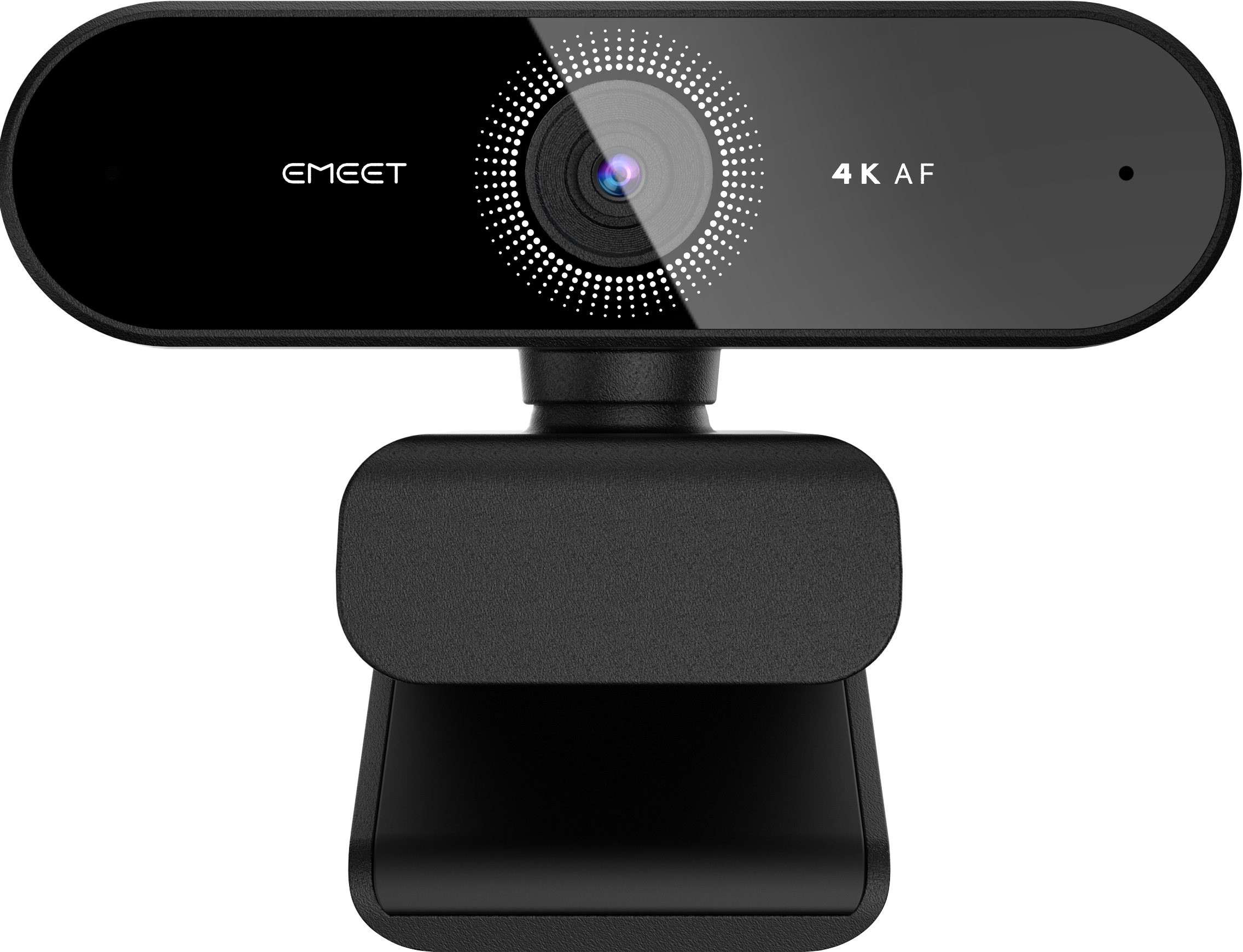
Pick 1 - Best budget
EMEET Nova 4K Webcam E3131
Check price on AmazonAt a glance:A straightforward 4K webcam comparison where exact listing identity is the first requirement.
Trade-off:Lighting, software, mounting and microphone performance remain setup-dependent.
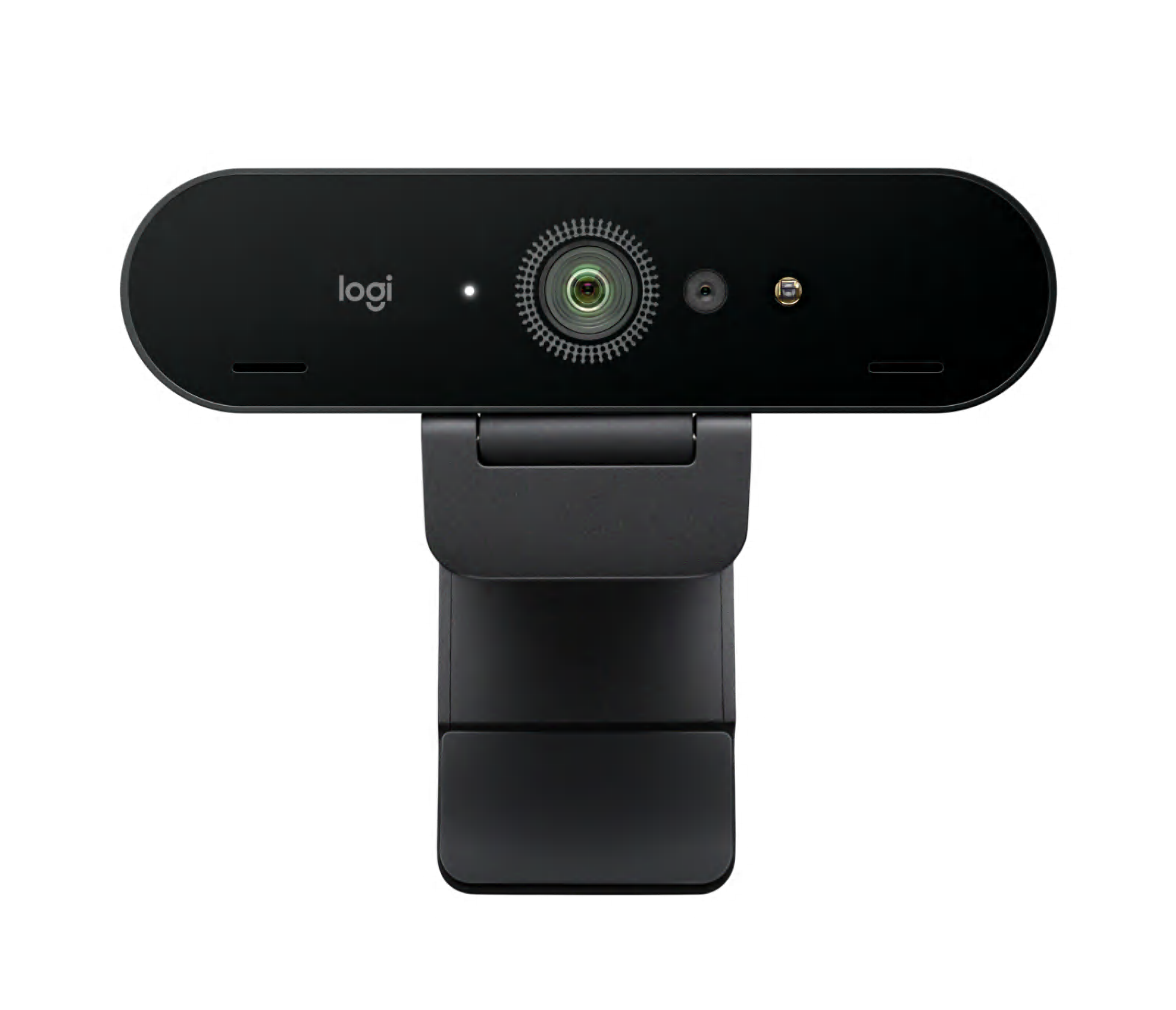
Pick 2 - Best overall
Logitech Brio 4K Webcam 960-001718
Check price on AmazonAt a glance:Buyers who value clear published setup documentation for a 4K webcam.
Trade-off:4K capture depends on the host USB connection and compatible software, so it is not a plug-and-forget result.
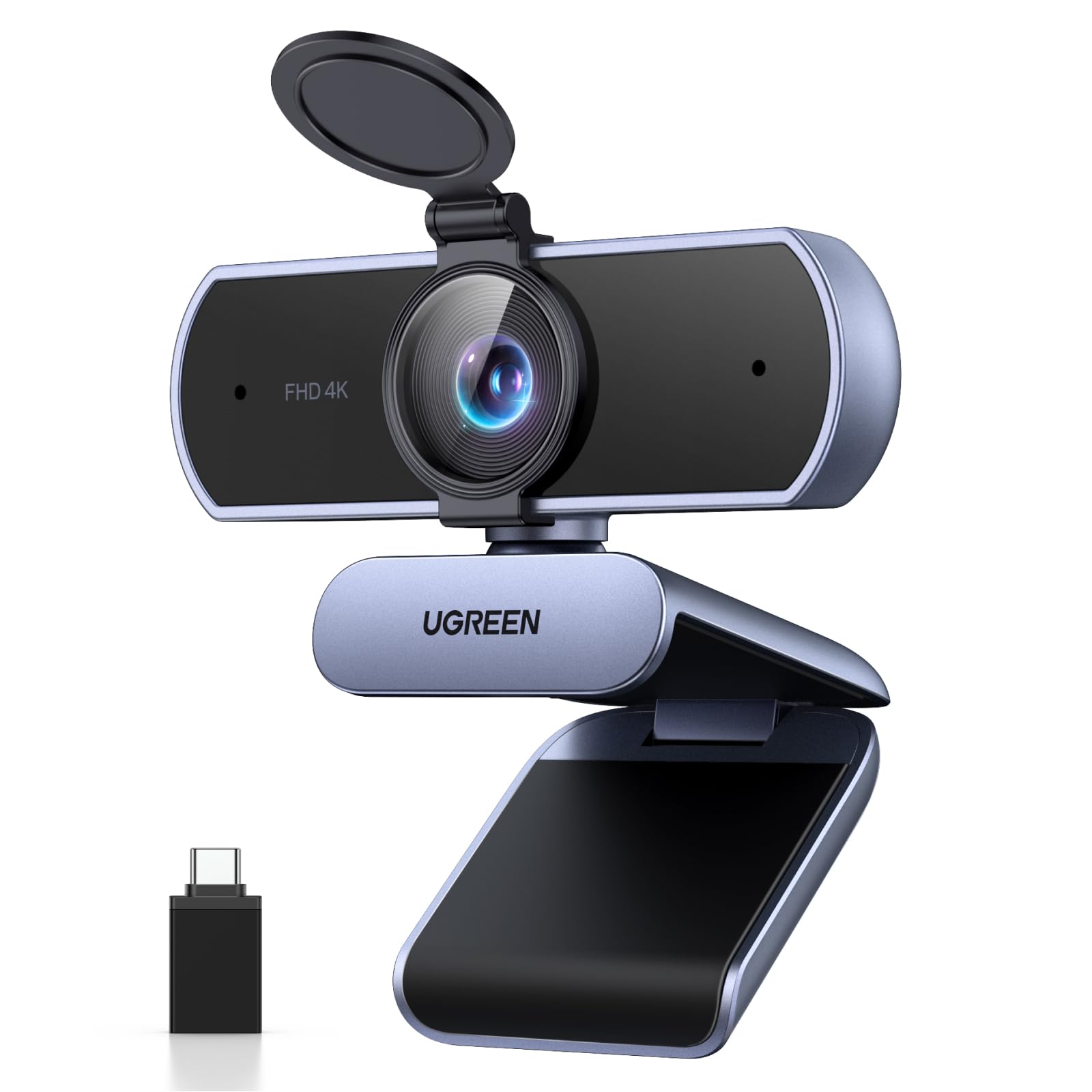
Pick 3 - Best premium
UGREEN 4K Webcam 65381
Check price on AmazonAt a glance:Buyers who want a published privacy-cover and adapter arrangement checked against their desk setup.
Trade-off:Check your display mount, host USB port and software rather than assuming universal compatibility.

Pick 4 - Best specialist or alternative
IPEVO V4K PRO 120 USB Visualiser 5-924-2-08-00
Check price on AmazonAt a glance:Hybrid workers who need to show documents, objects or a wider area in addition to video calls.
Trade-off:Its document-camera form factor and 120-degree field of view may be unnecessary for an ordinary single-person desk call.
Everyday Technology Desk: before you choose: Check the exact device, port, app, operating-system and warranty fit before checkout.
Decision checks: device and port fit · portability · support and warranty
The shortlist
Four options, with the trade-offs visible
Use the fit, limitations and checkout checks before opening a retailer page. Confirm the current price, stock, delivery and returns with the retailer.
Pick 1
Best budget
EMEET Nova 4K Webcam E3131
A current E3131 4K option for a buyer who first needs an exact model and straightforward desk-camera comparison. Check lighting, mount fit and software before treating it as the lower-spend route.
Affiliate retailer link. Check current price, stock, delivery and returns before buying.
Highlights
- Current 4K webcam candidate for buyers who first want exact model and connection continuity.
Drawbacks
- Lighting, software, mounting and microphone performance remain setup-dependent.
Buyer fit
Best for
- A straightforward 4K webcam comparison where exact listing identity is the first requirement.
Not for you if
- Buyers who need a proven conference-room or specialist document-camera workflow.
Check before buying
- Verify USB connection, monitor fit, privacy shutter, software support and return terms.
Pick 2
Overall winner
Best overall
Logitech Brio 4K Webcam 960-001718
The clearest general route because Logitech documents the exact part, its resolutions, cable, mounting and the USB 3.0 condition for 4K capture. It will not fix a poor room, light or microphone setup by itself.
Affiliate retailer link. Check current price, stock, delivery and returns before buying.
Highlights
- Exact part-number documentation covers resolution modes, cable, mounting and connection checks.
Drawbacks
- 4K capture depends on the host USB connection and compatible software, so it is not a plug-and-forget result.
Buyer fit
Best for
- Buyers who value clear published setup documentation for a 4K webcam.
Not for you if
- Buyers who need a dedicated wide-room or document-camera format.
Check before buying
- Check USB port type, camera placement, field of view, privacy shutter, software and seller terms.
Pick 3
Best premium
UGREEN 4K Webcam 65381
A premium setup-led choice for buyers who value the published privacy cover, USB-A-to-C adapter and 4K/30 or 1080p/60 modes. Confirm those details against the exact current listing before paying more for them.
Affiliate retailer link. Check current price, stock, delivery and returns before buying.
Highlights
- Documented model-specific features make it a useful setup-led alternative to a more conventional webcam.
Drawbacks
- Check your display mount, host USB port and software rather than assuming universal compatibility.
Buyer fit
Best for
- Buyers who want a published privacy-cover and adapter arrangement checked against their desk setup.
Not for you if
- Buyers needing a specialist document camera or a claim of measured low-light superiority.
Check before buying
- Confirm USB-A or USB-C route, monitor thickness, privacy-cover use, software support and returns.
Pick 4
Best specialist or alternative
IPEVO V4K PRO 120 USB Visualiser 5-924-2-08-00
The specialist route if showing documents, physical work or a wider desk area matters as much as face-to-camera calls. Its adjustable document-camera form factor is a benefit only when that is your actual workflow.
Affiliate retailer link. Check current price, stock, delivery and returns before buying.
Highlights
- A differentiated specialist route for people who need document, tabletop or wide-angle framing as well as calls.
Drawbacks
- Its document-camera form factor and 120-degree field of view may be unnecessary for an ordinary single-person desk call.
Buyer fit
Best for
- Hybrid workers who need to show documents, objects or a wider area in addition to video calls.
Not for you if
- Buyers who only need a compact monitor-mounted webcam.
Check before buying
- Confirm desk footprint, document-capture need, USB compatibility, mounting angle and seller return terms.
Top 4 comparison
Compare the useful differences, trade-offs and final checks side by side.
Before you compare
Check these first
- 1Confirm USB port type and version, cable length, camera position and monitor or tripod fit.
- 2Check whether the app you actually use can select the camera and desired resolution.
- 3Verify the exact model, privacy shutter or cover, included accessories, seller, return policy and warranty.
Your four roles
View specs & trade-offs
Trade-off:Lighting, software, mounting and microphone performance remain setup-dependent.
Not ideal for:Buyers who need a proven conference-room or specialist document-camera workflow.
Check:Verify USB connection, monitor fit, privacy shutter, software support and return terms.
Warranty and support:Check the current seller and EMEET support terms for the exact E3131 variant. • Use the maker documentation and current seller listing to confirm setup and support details.
Sources:EMEET Nova product page checked 2026-08-07 provides maker context for the Nova webcam family: https://emeet.com/products/webcam-nova.
View specs & trade-offs
Trade-off:4K capture depends on the host USB connection and compatible software, so it is not a plug-and-forget result.
Not ideal for:Buyers who need a dedicated wide-room or document-camera format.
Check:Check USB port type, camera placement, field of view, privacy shutter, software and seller terms.
Warranty and support:Check current Logitech and retailer warranty terms for the exact regional SKU. • Logitech publishes setup and support material for the exact 960-001718 model.
Sources:Logitech Brio 4K product page checked 2026-08-07 identifies part 960-001718 and its documented resolutions, mounting and USB requirements: https://www.logitech.com/en-ae/products/webcams/brio-4k.960-001718.html.
View specs & trade-offs
Trade-off:Check your display mount, host USB port and software rather than assuming universal compatibility.
Not ideal for:Buyers needing a specialist document camera or a claim of measured low-light superiority.
Check:Confirm USB-A or USB-C route, monitor thickness, privacy-cover use, software support and returns.
Warranty and support:Check current UGREEN and seller warranty terms for SKU 65381. • Use UGREEN documentation and the exact live retailer listing to confirm setup support.
Sources:UGREEN product page checked 2026-08-07 identifies SKU 65381, its published 4K/30 and 1080p/60 modes, privacy cover, adapter and field of view: https://www.ugreen.com/en-ca/products/ca-65381.
View specs & trade-offs
Trade-off:Its document-camera form factor and 120-degree field of view may be unnecessary for an ordinary single-person desk call.
Not ideal for:Buyers who only need a compact monitor-mounted webcam.
Check:Confirm desk footprint, document-capture need, USB compatibility, mounting angle and seller return terms.
Warranty and support:Check current IPEVO and retailer warranty terms for the exact regional item. • IPEVO publishes setup and support material for the V4K PRO 120.
Sources:IPEVO V4K PRO 120 overview checked 2026-08-07 identifies part 5-924-2-08-00, a 120-degree field of view, 4K document-camera format and adjustable arm: https://us.ipevo.com/pages/v4k-pro-120.
| Pick | Pick role | Best for | Avoid if | Key trade-off | Check before buying | Warranty/support status | Review/evidence basis | Retailer |
|---|---|---|---|---|---|---|---|---|
| 1. EMEET Nova 4K Webcam E3131 | Best budget | A straightforward 4K webcam comparison where exact listing identity is the first requirement. | Buyers who need a proven conference-room or specialist document-camera workflow. | Lighting, software, mounting and microphone performance remain setup-dependent. | Verify USB connection, monitor fit, privacy shutter, software support and return terms. | Check the current seller and EMEET support terms for the exact E3131 variant. • Use the maker documentation and current seller listing to confirm setup and support details. | EMEET Nova product page checked 2026-08-07 provides maker context for the Nova webcam family: https://emeet.com/products/webcam-nova. | Check retailer price |
| 2. Logitech Brio 4K Webcam 960-001718 | Best overall | Buyers who value clear published setup documentation for a 4K webcam. | Buyers who need a dedicated wide-room or document-camera format. | 4K capture depends on the host USB connection and compatible software, so it is not a plug-and-forget result. | Check USB port type, camera placement, field of view, privacy shutter, software and seller terms. | Check current Logitech and retailer warranty terms for the exact regional SKU. • Logitech publishes setup and support material for the exact 960-001718 model. | Logitech Brio 4K product page checked 2026-08-07 identifies part 960-001718 and its documented resolutions, mounting and USB requirements: https://www.logitech.com/en-ae/products/webcams/brio-4k.960-001718.html. | Check winner price |
| 3. UGREEN 4K Webcam 65381 | Best premium | Buyers who want a published privacy-cover and adapter arrangement checked against their desk setup. | Buyers needing a specialist document camera or a claim of measured low-light superiority. | Check your display mount, host USB port and software rather than assuming universal compatibility. | Confirm USB-A or USB-C route, monitor thickness, privacy-cover use, software support and returns. | Check current UGREEN and seller warranty terms for SKU 65381. • Use UGREEN documentation and the exact live retailer listing to confirm setup support. | UGREEN product page checked 2026-08-07 identifies SKU 65381, its published 4K/30 and 1080p/60 modes, privacy cover, adapter and field of view: https://www.ugreen.com/en-ca/products/ca-65381. | Check retailer price |
| 4. IPEVO V4K PRO 120 USB Visualiser 5-924-2-08-00 | Best specialist or alternative | Hybrid workers who need to show documents, objects or a wider area in addition to video calls. | Buyers who only need a compact monitor-mounted webcam. | Its document-camera form factor and 120-degree field of view may be unnecessary for an ordinary single-person desk call. | Confirm desk footprint, document-capture need, USB compatibility, mounting angle and seller return terms. | Check current IPEVO and retailer warranty terms for the exact regional item. • IPEVO publishes setup and support material for the V4K PRO 120. | IPEVO V4K PRO 120 overview checked 2026-08-07 identifies part 5-924-2-08-00, a 120-degree field of view, 4K document-camera format and adjustable arm: https://us.ipevo.com/pages/v4k-pro-120. | Check retailer price |
Choose this if / Avoid this if
Rule out poor-fit options before comparing finer details.
Avoid if
- The real issue is echo, poor lighting, bandwidth or a weak microphone rather than the camera.
- You need a surveillance, security or guaranteed performance product.
Dealbreakers
- The exact product code is not shown on the listing.
- Your laptop, dock, monitor or meeting software cannot support the required setup.
Check before buying
- Confirm USB port type and version, cable length, camera position and monitor or tripod fit.
- Check whether the app you actually use can select the camera and desired resolution.
- Verify the exact model, privacy shutter or cover, included accessories, seller, return policy and warranty.
Choose another shortlist if
- Choose a USB microphone or home-office lighting route if that solves the actual call issue.
- Choose a document-camera route if face-to-camera video is not your primary job.
Detailed buyer guidance
First decide whether 4K is solving the right problem
Before spending on a webcam, test one call from the position you will actually use. If the image is dark because the window is behind you, the sound is poor because the mic is across the room, or the laptop is using a slow hub, more resolution will not remove the bottleneck.
If the camera is the bottleneck, the four picks give four distinct routes:
- EMEET Nova is the simple current 4K comparison point.
- Logitech Brio is the normal desk-call starting point with clear published setup documentation.
- UGREEN 65381 is for a buyer who values its published privacy-cover and adapter arrangement.
- IPEVO V4K PRO 120 is for a desk that regularly needs to show paper, objects or a wider area.
Set it up in the right order
- Put the camera at eye height where possible; a camera below the display usually gives an unhelpful angle.
- Check the USB port, dock and cable before enabling higher resolution in software.
- Place the main light in front of you rather than relying on a bright background.
- Test the exact meeting platform you use—not only the camera’s own preview.
If you need a route for voice rather than video, go to USB microphones for Zoom and Teams. If lighting is the issue, use desk lamps for video calls before changing camera.
What would change the winner?
The lead pick remains the right starting point only while this shortlist matches your priorities. Reconsider it when a different use case or fit requirement matters more.
Known limitations
UK Shortlists has not performed a controlled webcam, microphone or low-light test. Use this page to narrow the setup, then verify the exact listing.
How we chose
The checks behind the four picks
Rebuilt on 7 August 2026 with exact current models, maker documentation and live Amazon UK destination checks. We compare published setup facts and trade-offs; we do not claim a universal call-quality, microphone or low-light winner.
- Step 1: Exact current model and UK destination
- Step 2: Published resolution, connection, mounting and framing facts
- Step 3: Whether the form factor solves a normal desk call or a specialist document workflow
- Step 4: Explicit setup trade-offs rather than manufacturer superlatives
Disclosure
Last reviewed: 07/08/2026
UK Shortlists may earn a commission when you use some retailer links. This does not increase the price you pay.
As an Amazon Associate we earn from qualifying purchases.
Retailers cannot pay to change which products we recommend or their order.
Prices, stock, delivery and returns can change. Confirm the final details with the retailer before buying.
Read more about how UK Shortlists makes money, retailer checks, and how corrections are handled.
Who checked this shortlist?
- Written / compiled by:
- Everyday Technology Desk
- Reviewed by:
- UK Shortlists Editorial Team
- Last reviewed:
- 07/08/2026
- Review basis:
- Criteria-based comparison
We compare published product information, retailer details and the buying criteria shown above. UK Shortlists does not currently publish claims based on first-party product use, laboratory testing or long-term testing.
FAQs & alternatives
Does 4K automatically make video calls look better?
No. The host connection, software, camera height, light and background can be more important. 4K is only useful when the full setup supports it.
Why is the IPEVO a Specialist rather than a normal webcam winner?
Its adjustable document-camera design is useful for documents and physical work, but can be unnecessary overhead for a simple monitor-mounted call camera.
Can I compare current deals here?
No. We deliberately omit live prices and stock. Use the exact retailer links after deciding which setup trade-off matters.
Newsletter
Want the next useful buying check?
Get occasional UK Shortlists updates for decisions like this. Unsubscribe at any time.
Related shortlists
- Audio interfaces under £150: buying checks and shortlist under review
Use this if your fixed price ceiling is more important than broad feature depth.
- Best Creator Streaming Setup Gear in the UK (2026)
Use this related shortlist to compare trade-offs before finalising your Top 4 pick.
- Best Headphone Stand and Audio Cable Clip Checks from Amazon and AliExpress in the UK (2026)
Use this related shortlist to compare trade-offs before finalising your Top 4 pick.
- Best HP Dual-Ear USB Headsets in the UK (2026)
Use this related shortlist to compare trade-offs before finalising your Top 4 pick.
- Best HP Headsets with AI Noise-Reduction Microphones in the UK (2026)
Use this related shortlist to compare trade-offs before finalising your Top 4 pick.
- Best HP Headsets with Carrying Cases in the UK (2026)
Use this related shortlist to compare trade-offs before finalising your Top 4 pick.